Legal firm management software development
LFMS: Legal Firm Management Software Development
Enquire Now01 / Inside LFMS
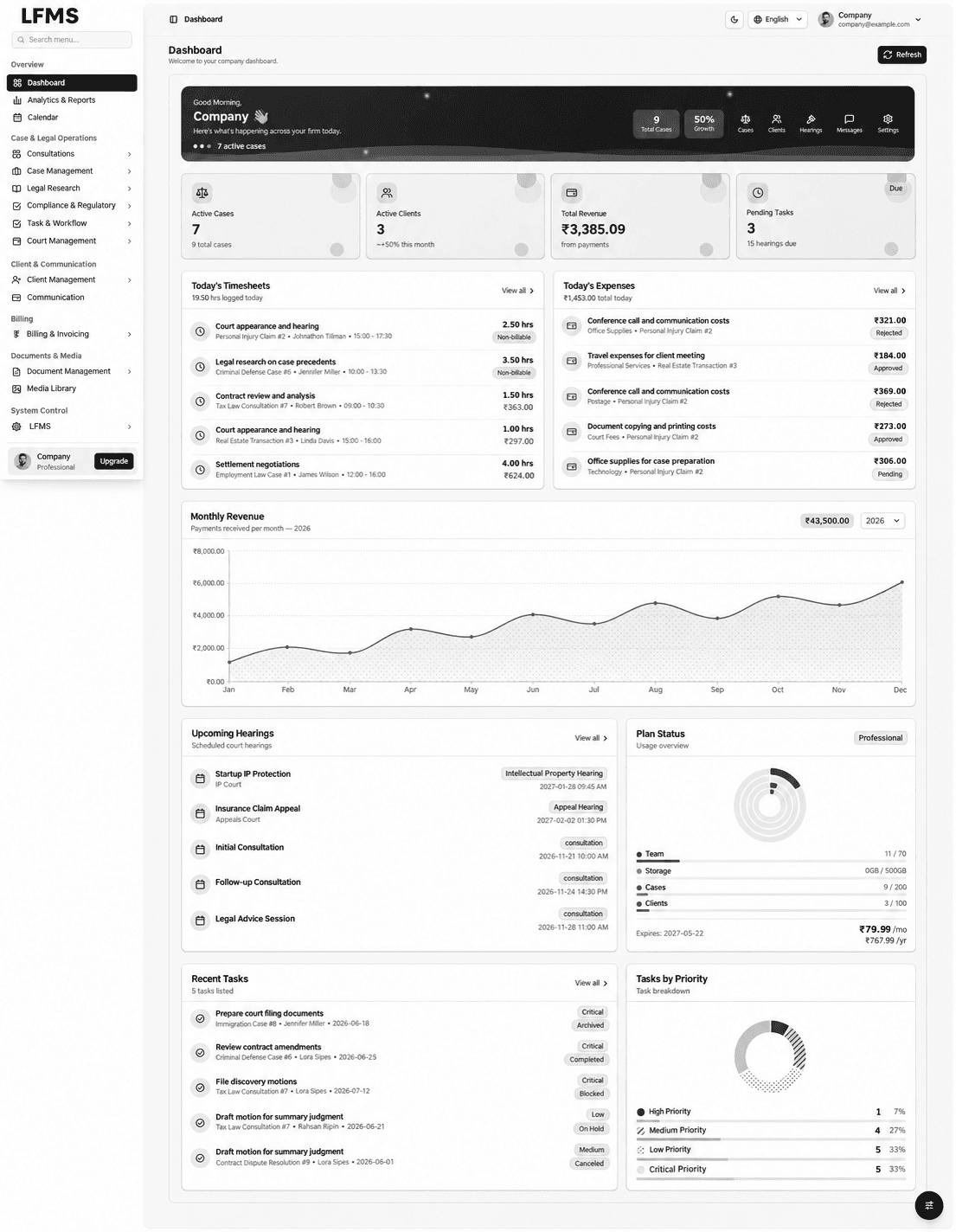
LFMS overview: one workspace for a legal practice
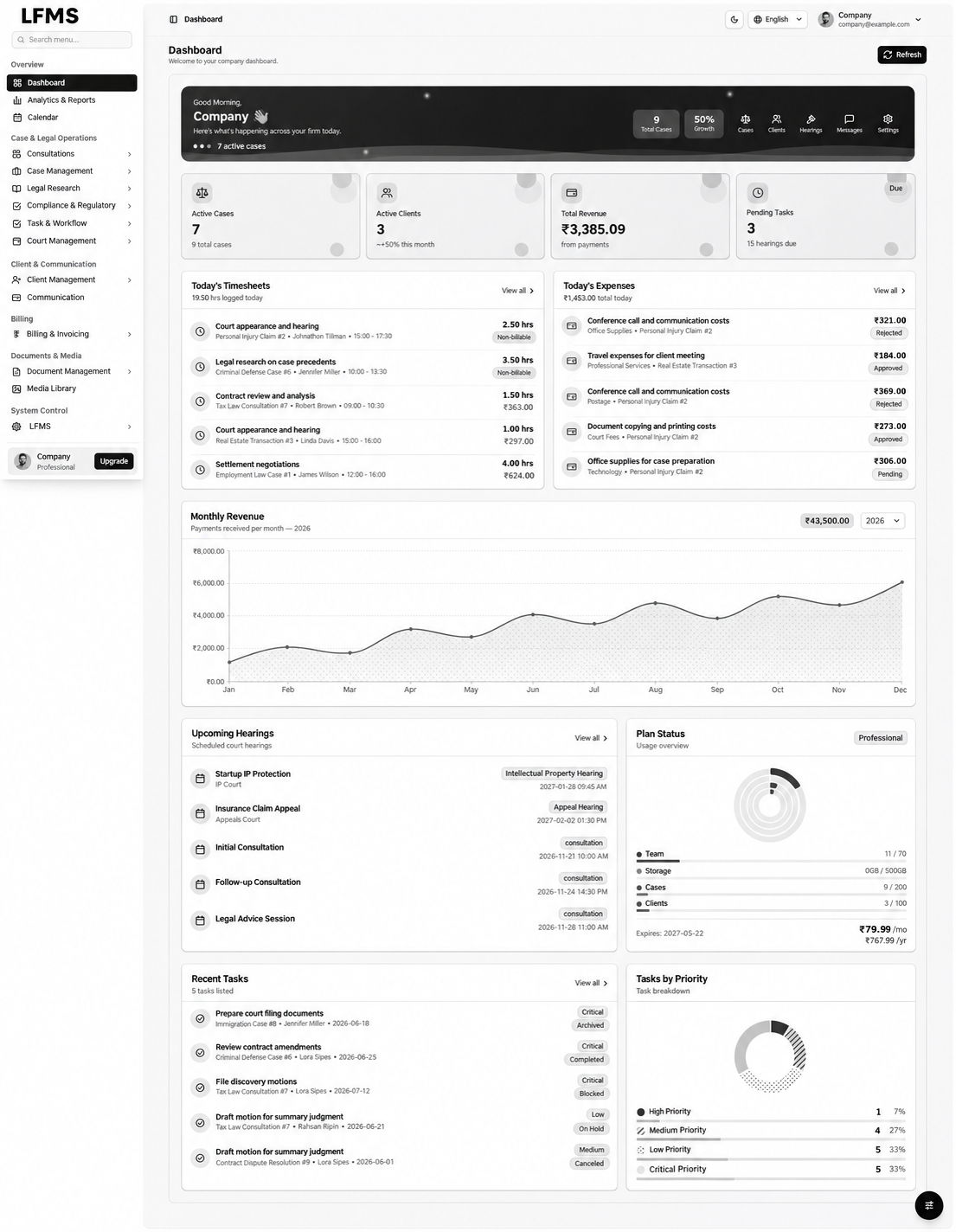
LFMS connects consultations, cases, hearings, legal research, tasks, documents and billing in a law firm management workspace. The dashboard brings active matters, pending work, time entries, expenses and upcoming hearings into view, giving the team a starting point for the day before it opens an individual record.
Legal firm management software development is most useful when it follows how a practice actually works. A consultation needs an assigned advocate and a clear next step. A hearing needs its case and court context. A bill needs the work and expenses behind it. Bizzeonline approaches custom software development by defining these relationships, access boundaries and responsibilities before building the interface.
- A connected view of casework, team activity and practice administration.
- A consistent LFMS black-and-white interface with focused navigation.
- Detailed registers and working views for each stage of a matter.
- Industry
- Professional Services, Enterprise Software
- Services / expertise
- Legal Software Development · Law Firm Management Software · Advocate Management System · Legal Case Management · Custom Software Development
- Project focus
- Legal firm management and advocate management software
- Core workflows
- Consultations, cases, hearings, tasks, research, documents and billing
- Implementation approach
- React.js, Java Spring Boot, PostgreSQL and AWS
Planning a similar project? Explore our custom software development services.
02 / Inside LFMS
The practice-management challenge: preserving context between people and tasks
Legal teams often coordinate appointments, case updates, research notes, hearing dates and billing information across separate tools. A matter can be familiar to one person but difficult for the next advocate or administrator to understand. Re-entering the same information also makes changes harder to track.
Our starting point is the workflow: which record starts the process, who owns the next action and which information must remain available throughout the matter. This gives law firm software development a practical brief, with agreed priorities and acceptance checks rather than a list of disconnected features.
- Define ownership for consultation, case, task and document records.
- Connect scheduling and work allocation with the relevant matter.
- Prioritise the handovers that create repeated manual coordination.
03 / Inside LFMS
Consultations: from appointment to a structured legal matter
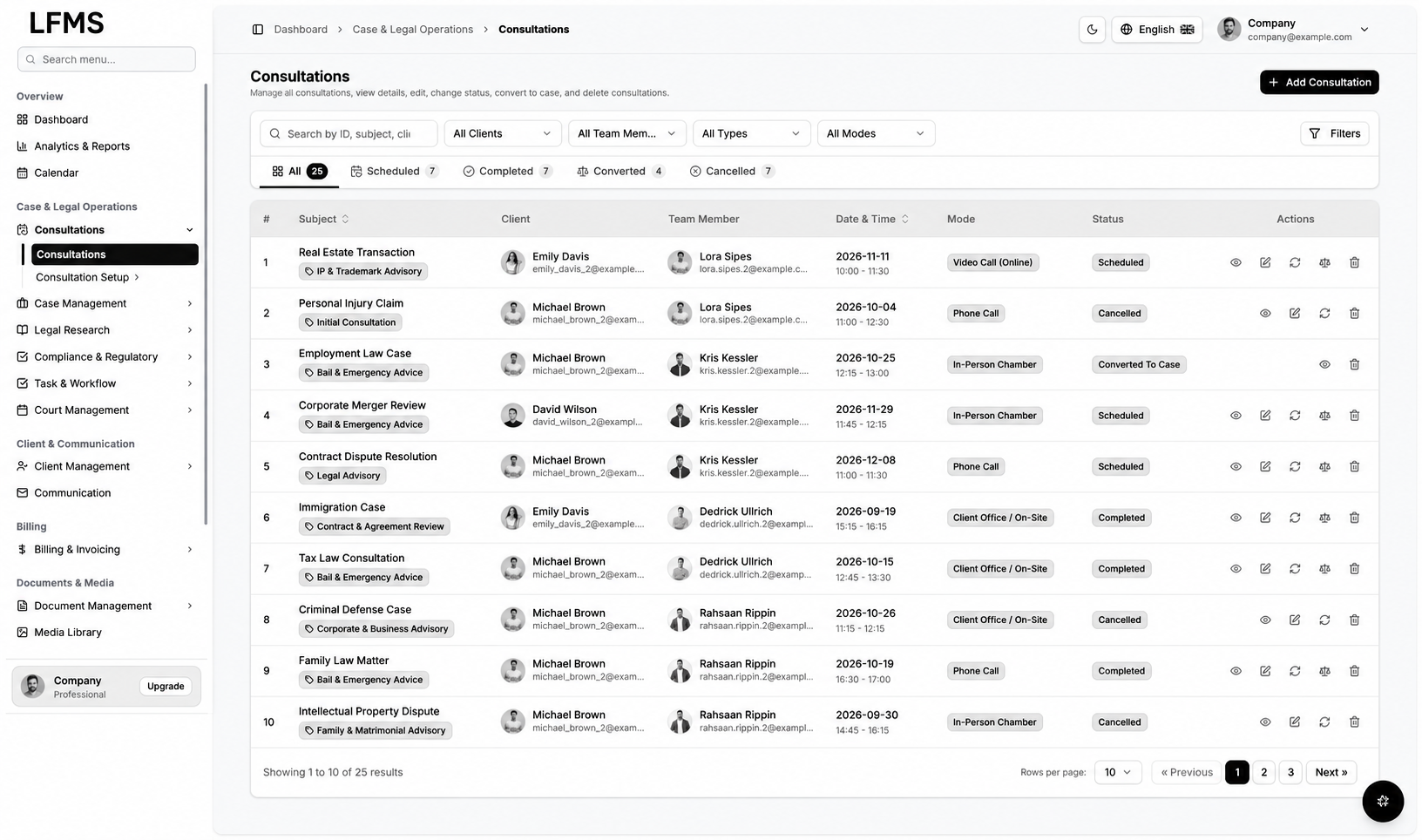
The consultation register groups appointments by subject, client, team member, date, mode and status. Search and filters let staff focus on a particular client, advocate or appointment type. A consultation detail adds the fee, payment state, time slot, description and related documents, notes and tasks.
An advocate management system needs a clear transition from an initial enquiry to ongoing work. Bizzeonline can map scheduling, assignment, completion and conversion-to-case rules with the practice. Preserving consultation context during that handover helps the next person understand the work without having to rebuild its history.
- Appointment information stays connected with the client and assigned team.
- Detailed records retain notes, documents and task context.
- Consultation-to-case transitions are defined as part of the workflow.
04 / Inside LFMS
Consultation types and modes that administrators can maintain
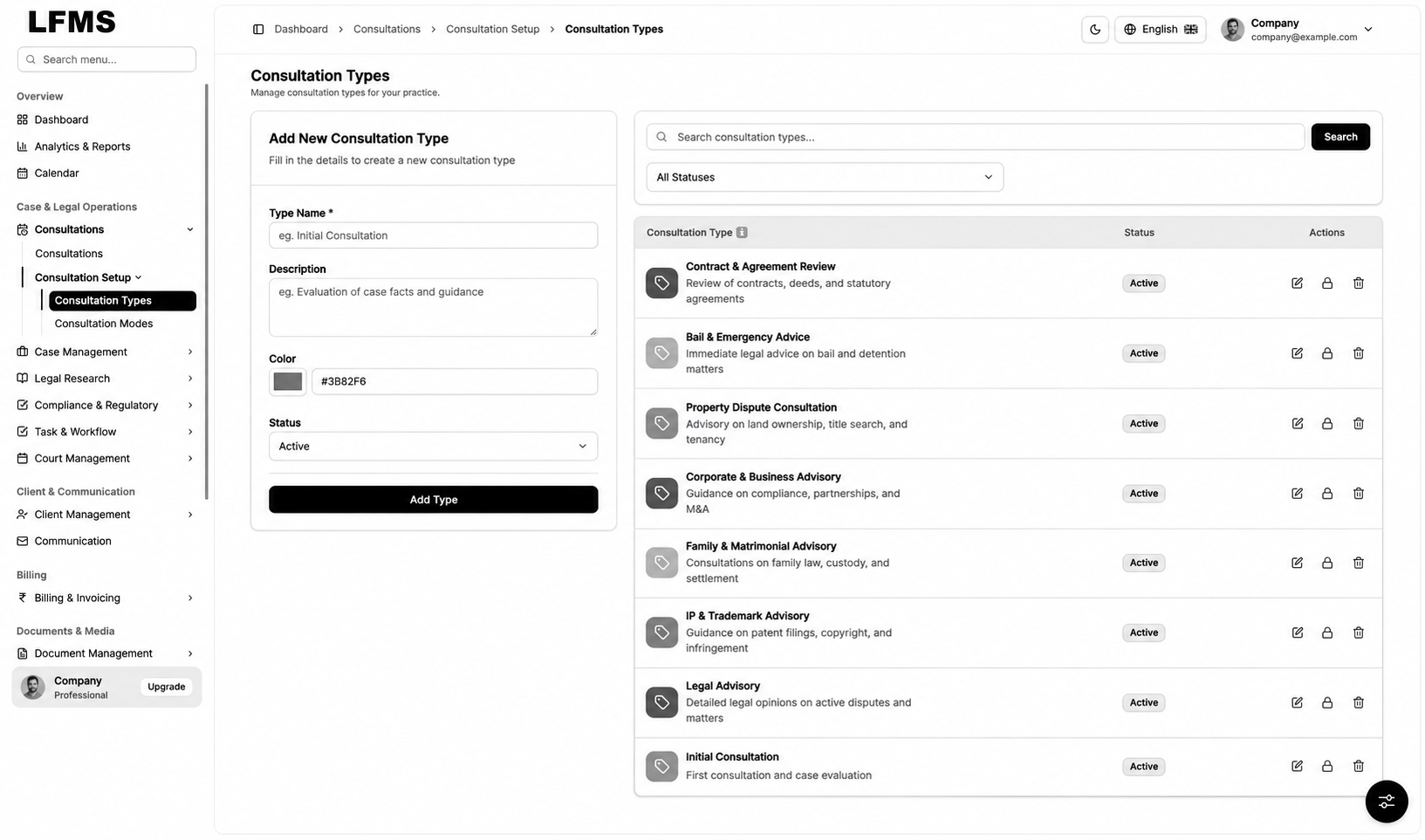
Consultation Types provides a dedicated place for maintaining the categories used by the practice. Consultation Modes distinguishes how a session is conducted, including in-person, video, telephone and on-site appointments. These reference records support consistent booking and filtering.
Custom legal software should make routine administration understandable to the people who maintain it. Our team separates reference-data changes from day-to-day appointments and defines how archived options remain visible in historical records. This helps a practice change its service offering without rewriting past activity.
- Maintain appointment categories and delivery modes separately.
- Keep booking options consistent across the register and detail screens.
- Plan how configuration changes affect existing records.
05 / Inside LFMS
Legal case management with team, status and priority context
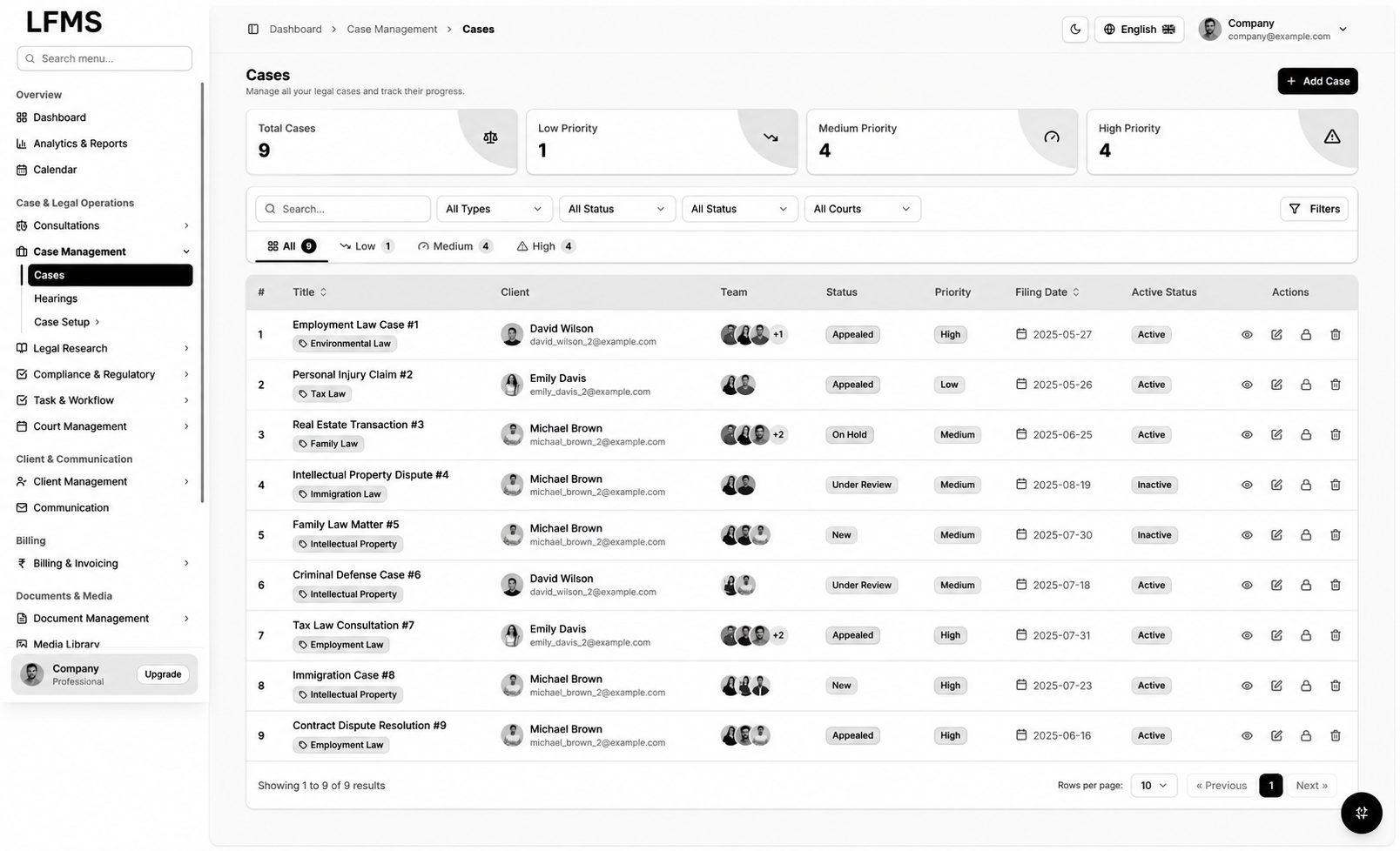
The case register combines matter title, client, team, status, priority, filing date and availability in one working view. Filters support review by type, status or court. Case Types gives administrators a structured way to organise the categories used across the practice.
Legal case management software development must distinguish matter progress from access and administrative state. Bizzeonline defines who can create, assign, update, archive or reopen a case and which changes should be retained in history. The aim is a shared record that supports collaboration without allowing important context to disappear during a handover.
- Matter records retain the client, responsible team and filing context.
- Priority and progress remain visible without opening every case.
- Reference categories support consistent classification and reporting.
06 / Inside LFMS
Hearings and court records: scheduling with the matter in view
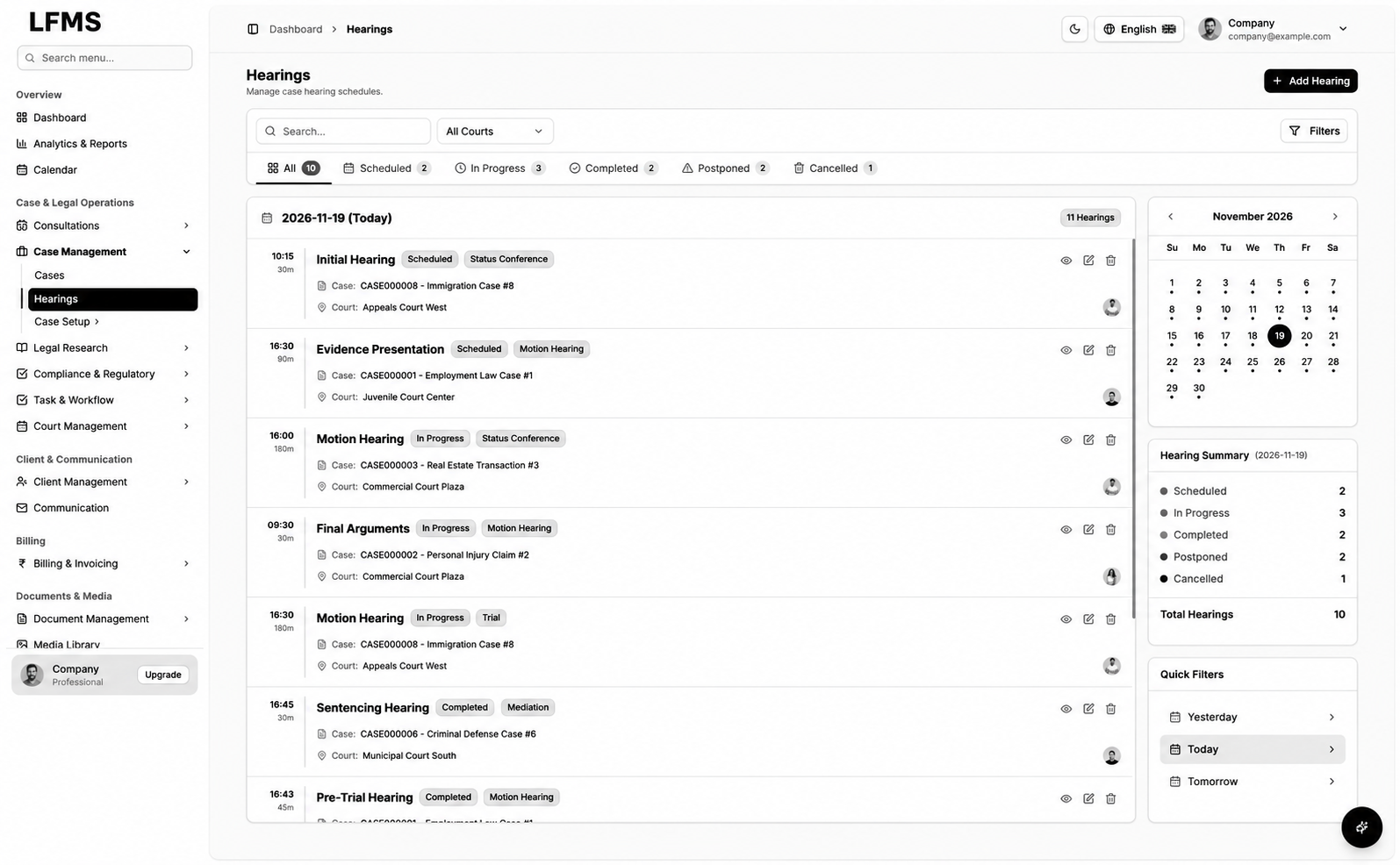
The hearing view combines scheduled events, case references, court information, time and processing state with a calendar and summary filters. Courts maintains the locations, types, jurisdictions and contact context used by the scheduling workflow.
For a legal practice management platform, reminders and calendar integrations should follow agreed scheduling responsibilities. Our discovery process clarifies who changes a date, how a postponement is recorded and how the team is informed. The court register supports administration; it does not establish a live court-system integration unless that connection is separately scoped.
- Hearings stay linked to their case and court records.
- Calendar and status views support daily scheduling review.
- Date changes and notification responsibilities are agreed explicitly.
07 / Inside LFMS
Task and workflow management across advocates and support staff
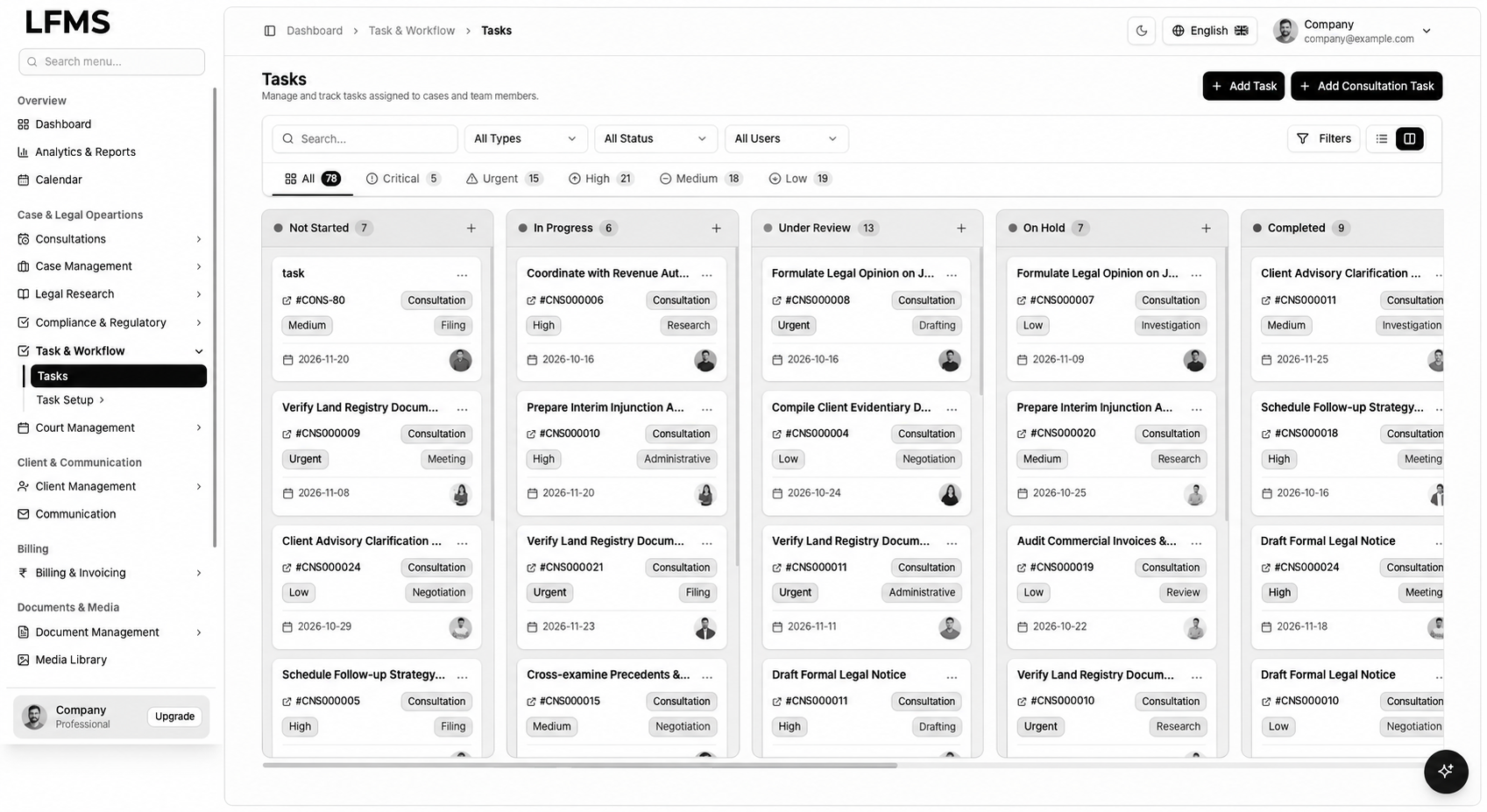
The task board organises work into stages such as not started, in progress, under review, on hold and completed. Individual cards retain the consultation or matter reference, task type, priority, due date and responsible person. Filters help the team review a particular workload.
A useful advocate management software workflow makes responsibility visible. Bizzeonline can define assignment, review, escalation and completion rules around the practice’s process, with permission checks for sensitive work. Task automation should support those responsibilities instead of moving work between columns without a clear owner.
- Work stages and assignments visible from a shared board.
- Tasks retain their consultation or case reference.
- Due dates, priority and review rules planned around team responsibilities.
08 / Inside LFMS
Research projects with notes, citations and case context
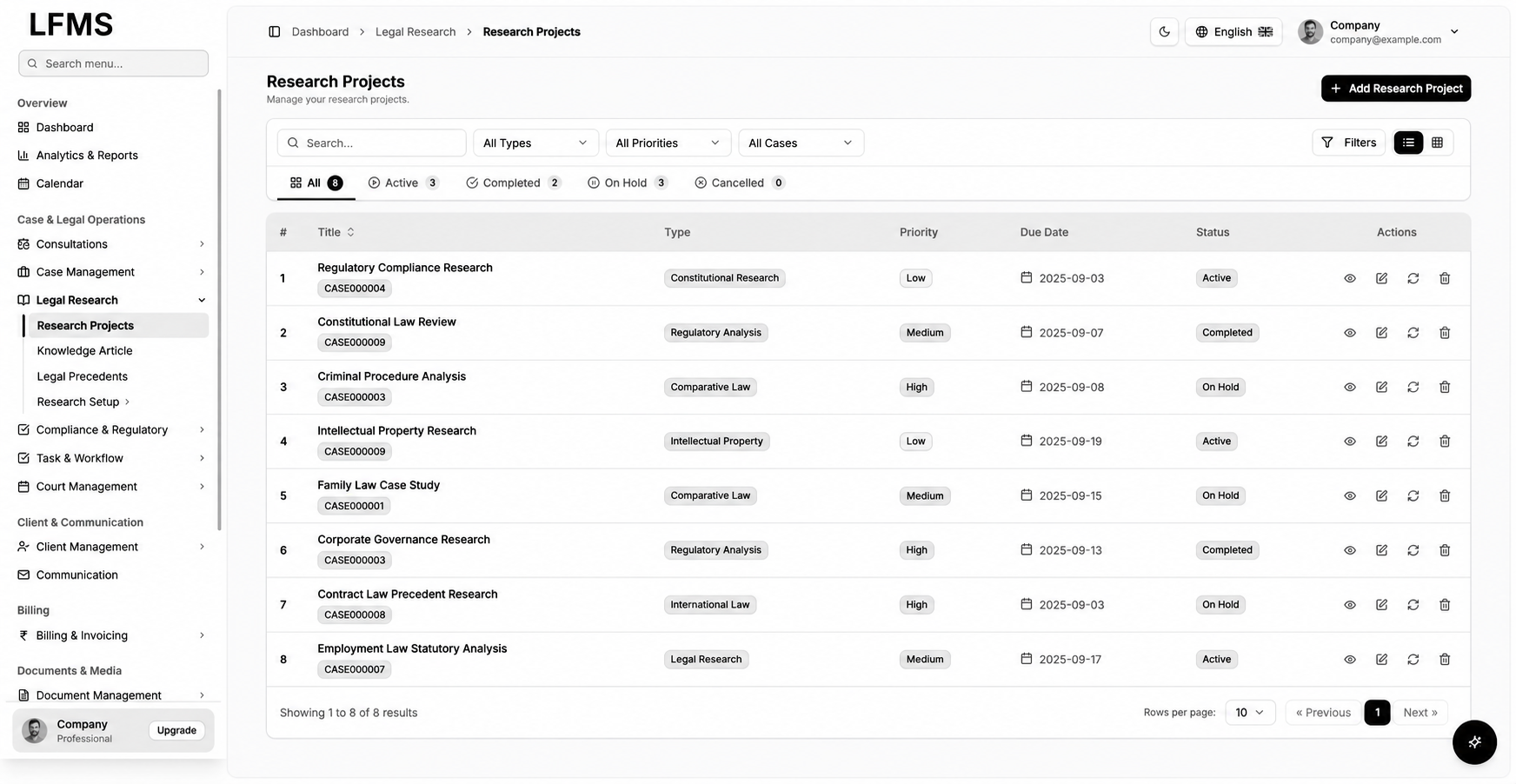
Research Projects gives the team a register of investigations with type, related case, priority, due date and status. Opening a project brings its description, research notes and citation area together, keeping supporting material close to the question being investigated.
For custom legal software development, our team maps how research is assigned, reviewed and associated with an active matter. Source references and authorship should remain visible when findings are reused. The workflow supports professional research and review; it does not treat a stored citation or generated summary as a verified legal conclusion.
- Research work retains its associated case and review state.
- Notes and citations are organised within the research project.
- Source and ownership context support later review and reuse.
09 / Inside LFMS
Knowledge articles and legal precedents as a maintained library
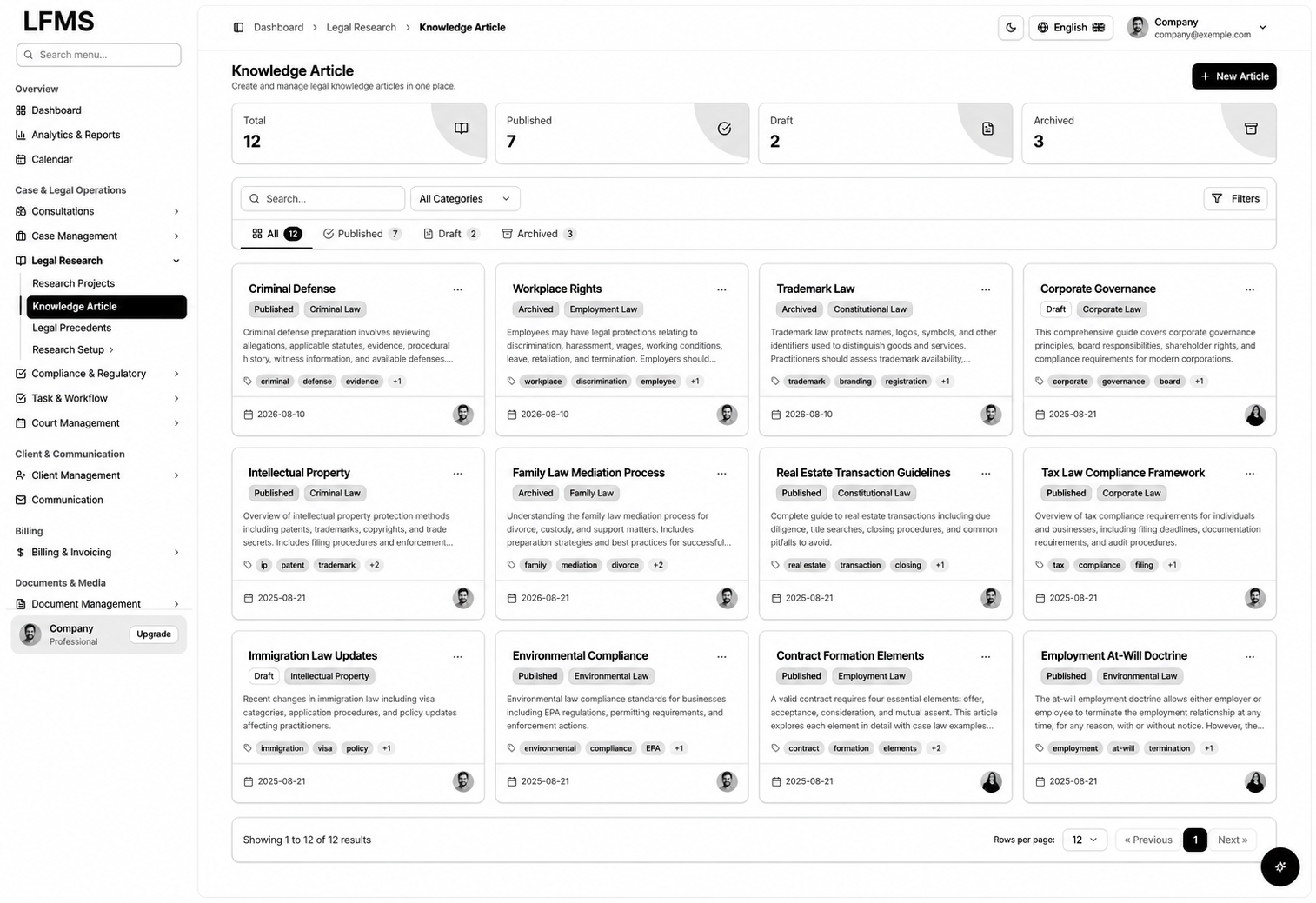
Knowledge Articles organises reusable material by category, status, tags, date and author. Legal Precedents keeps case names, citation references, jurisdictions, relevance and decision dates in a searchable register. Together, these views support a more structured reference library than scattered documents.
A legal document and knowledge platform needs clear curation responsibilities. Bizzeonline can plan review dates, version history, access controls and links to the original sources. The sample references illustrate the interface structure; their presence is not a claim that the source material is current, authoritative or applicable to a particular matter.
- Reusable knowledge grouped by category, tags and publication state.
- Precedent references retain jurisdiction and source context.
- Review ownership and versioning planned alongside search.
10 / Inside LFMS
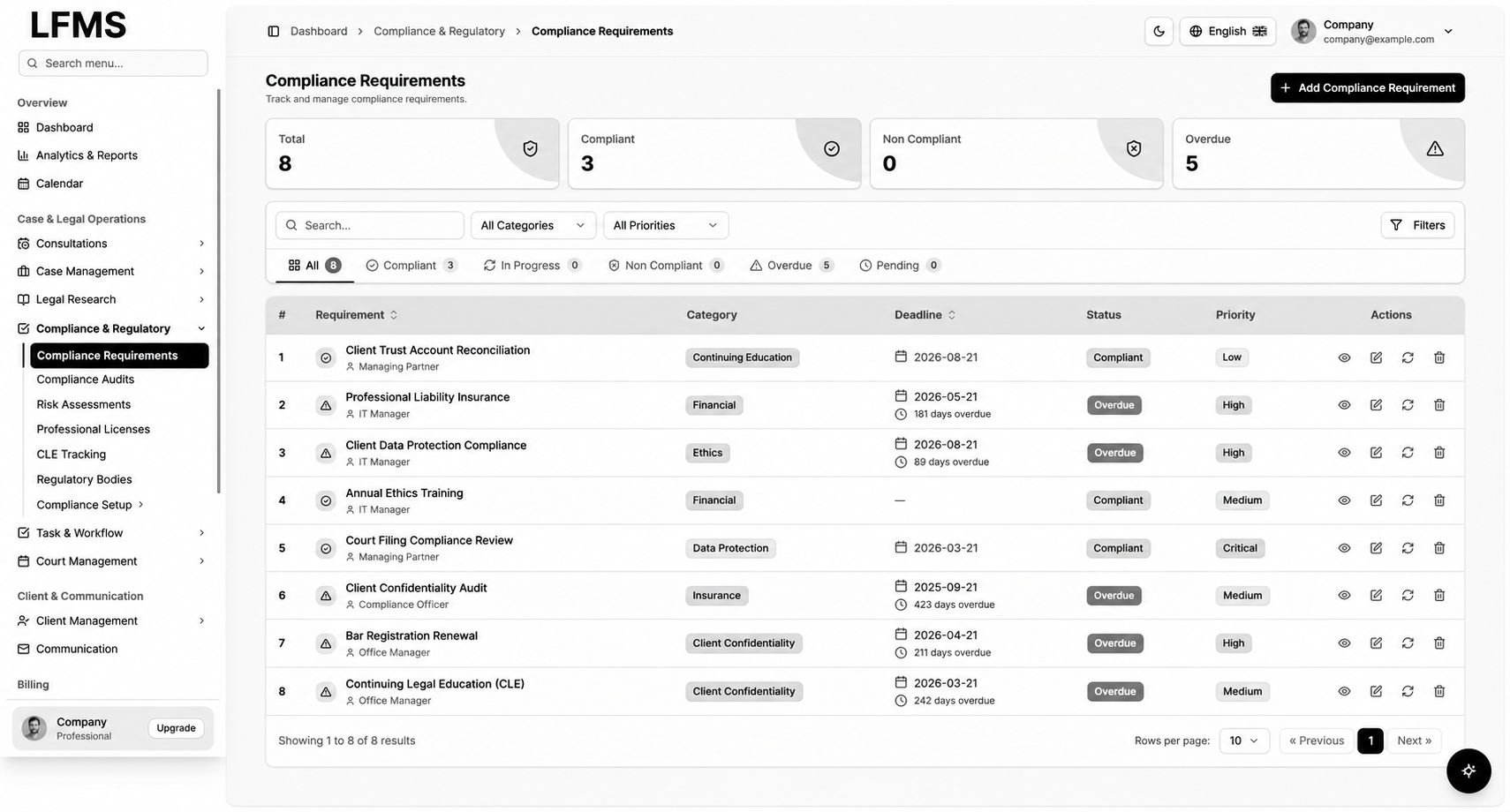
Compliance requirements with deadlines and assigned responsibility
Compliance Requirements brings the requirement, category, responsible role, deadline, status and priority into one register. Summary counts and filters help administrators find the records that need review and distinguish completed work from overdue obligations.
Compliance software development should begin with requirements supplied and approved by the practice. Bizzeonline maps ownership, reminder schedules, evidence requirements and review steps into the application. A status badge supports administration; compliance decisions and jurisdiction-specific obligations remain subject to the practice’s professional review.
- Requirements retain an owner, deadline and review state.
- Filters make pending and overdue work easier to locate.
- Evidence and reminder workflows are scoped around approved requirements.
11 / Inside LFMS
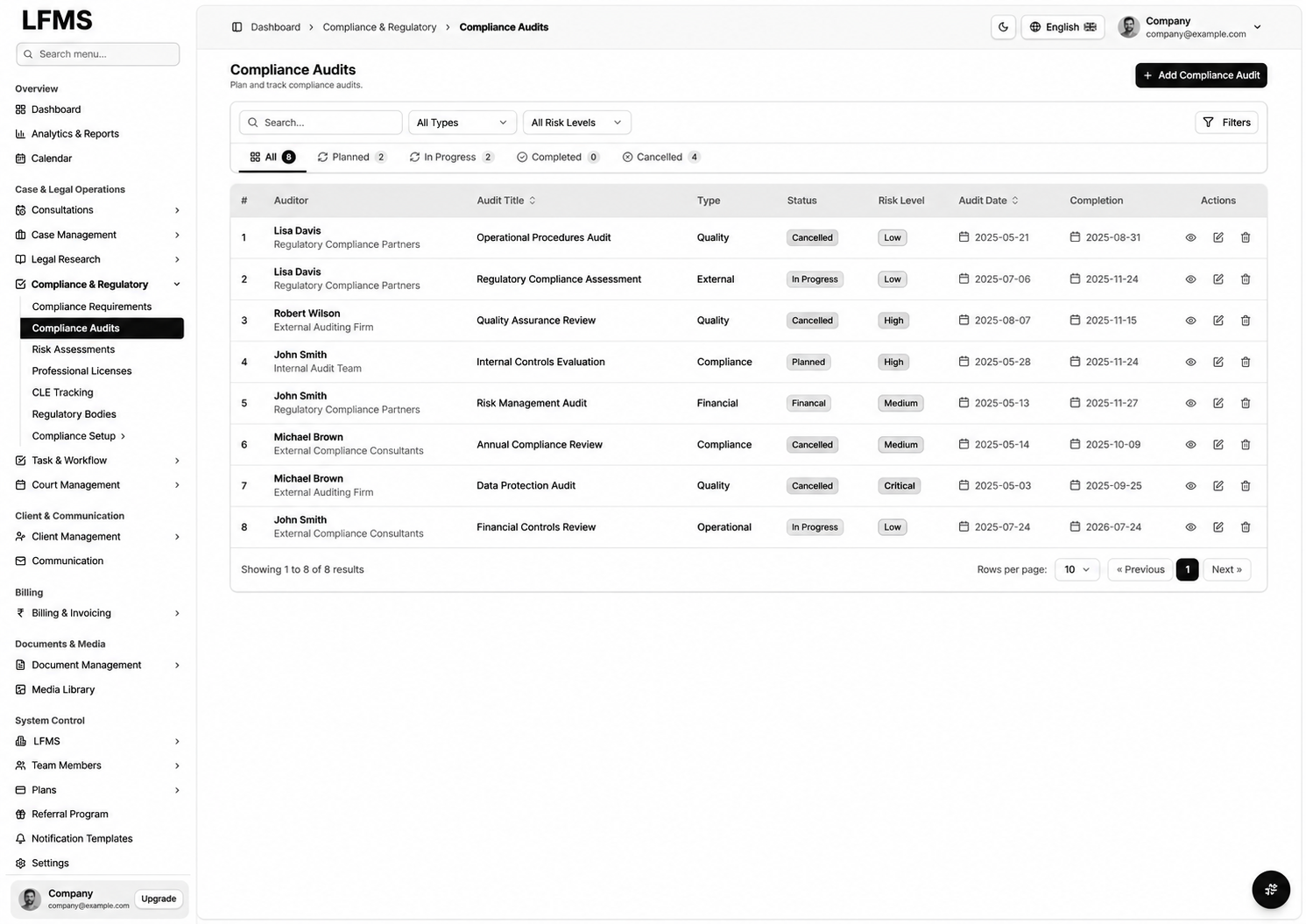
Audits and risk assessments with a traceable review process
Compliance Audits maintains auditor details, audit title, type, status, risk level and dates. Risk Assessments adds the responsible person, assessment state and risk classification, with a matrix view for reviewing probability and impact.
Bizzeonline can define how an identified issue becomes assigned work, how mitigation evidence is recorded and when a record is reviewed again. This gives legal operations software a structured administrative process without promising that software alone can eliminate risk or satisfy every compliance requirement.
- Audit schedules and ownership in a dedicated register.
- Risk records retain classification, status and review responsibility.
- Mitigation work and supporting evidence can be included in the scope.
12 / Inside LFMS
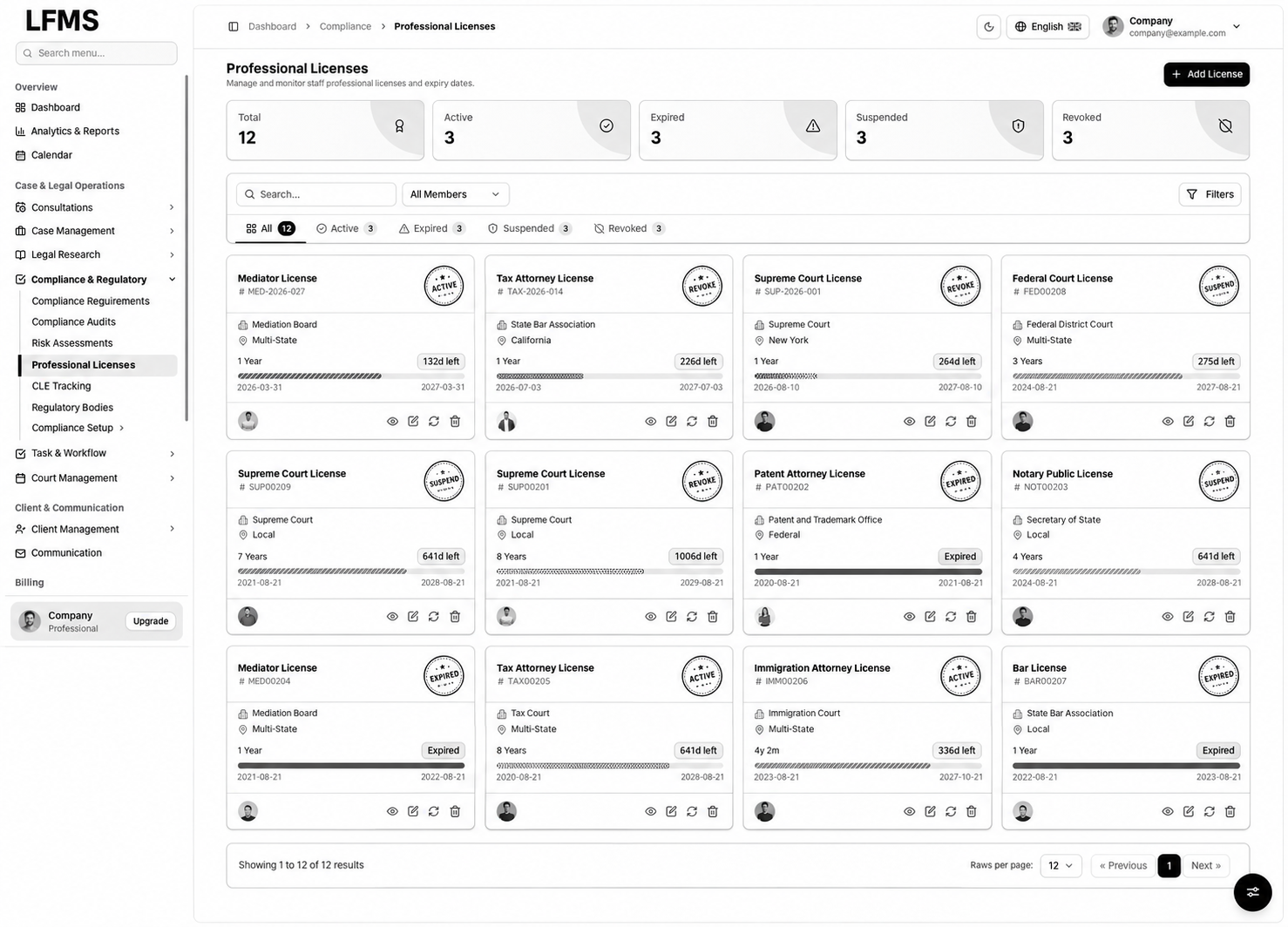
Professional licences, CLE tracking and regulatory contacts
Professional Licenses organises licence identifiers, issuing bodies, jurisdictions, dates, holders and status. CLE Tracking provides a separate record of courses, providers, credits and completion information. Regulatory Bodies maintains the contact and reference information used by administrators.
A law firm management system should keep these records separate while making their relationships clear. Our development process establishes renewal reminders, evidence attachments and review permissions according to the practice’s requirements. Tracking a record does not independently validate professional eligibility or regulatory compliance.
- Licence and renewal context available alongside the relevant holder.
- Training records keep provider, credits and completion details together.
- Regulatory contacts maintained as reference information.
13 / Inside LFMS
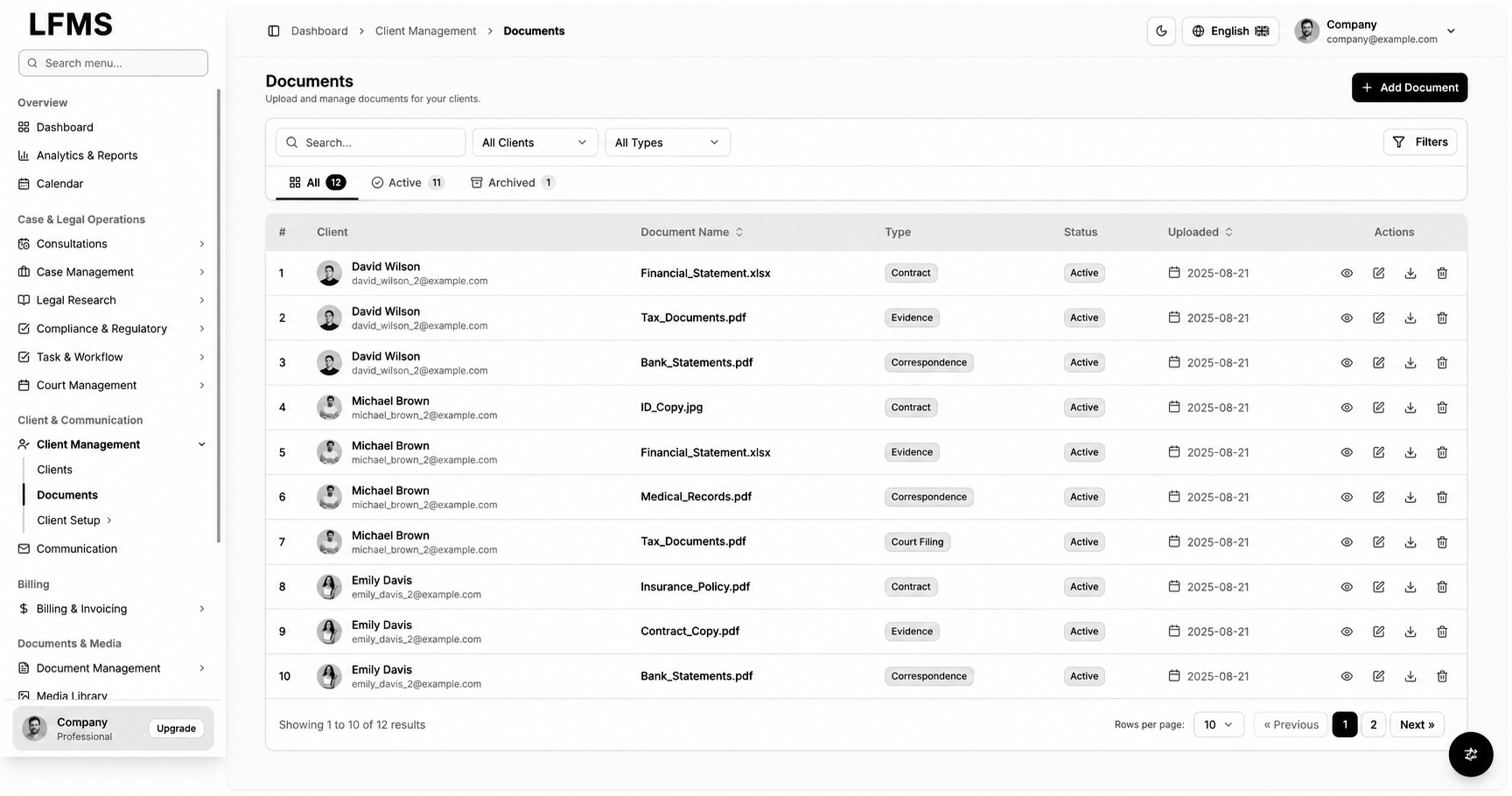
Client documents with clear classification and access boundaries
The client document register keeps the client, file name, document type, upload date and availability together. Search and filters help staff locate material associated with the relevant person or organisation, with actions for viewing or downloading according to the planned access rules.
Legal document management software development needs precise ownership and confidentiality controls. Bizzeonline maps matter-level access, versioning, retention and download permissions before implementation. Secure storage and server-side authorisation should support the document workflow, rather than relying on a hidden button to protect sensitive files.
- Documents retain client and classification context.
- Search and status filters support retrieval and administration.
- Access, retention and versioning requirements are defined explicitly.
14 / Inside LFMS
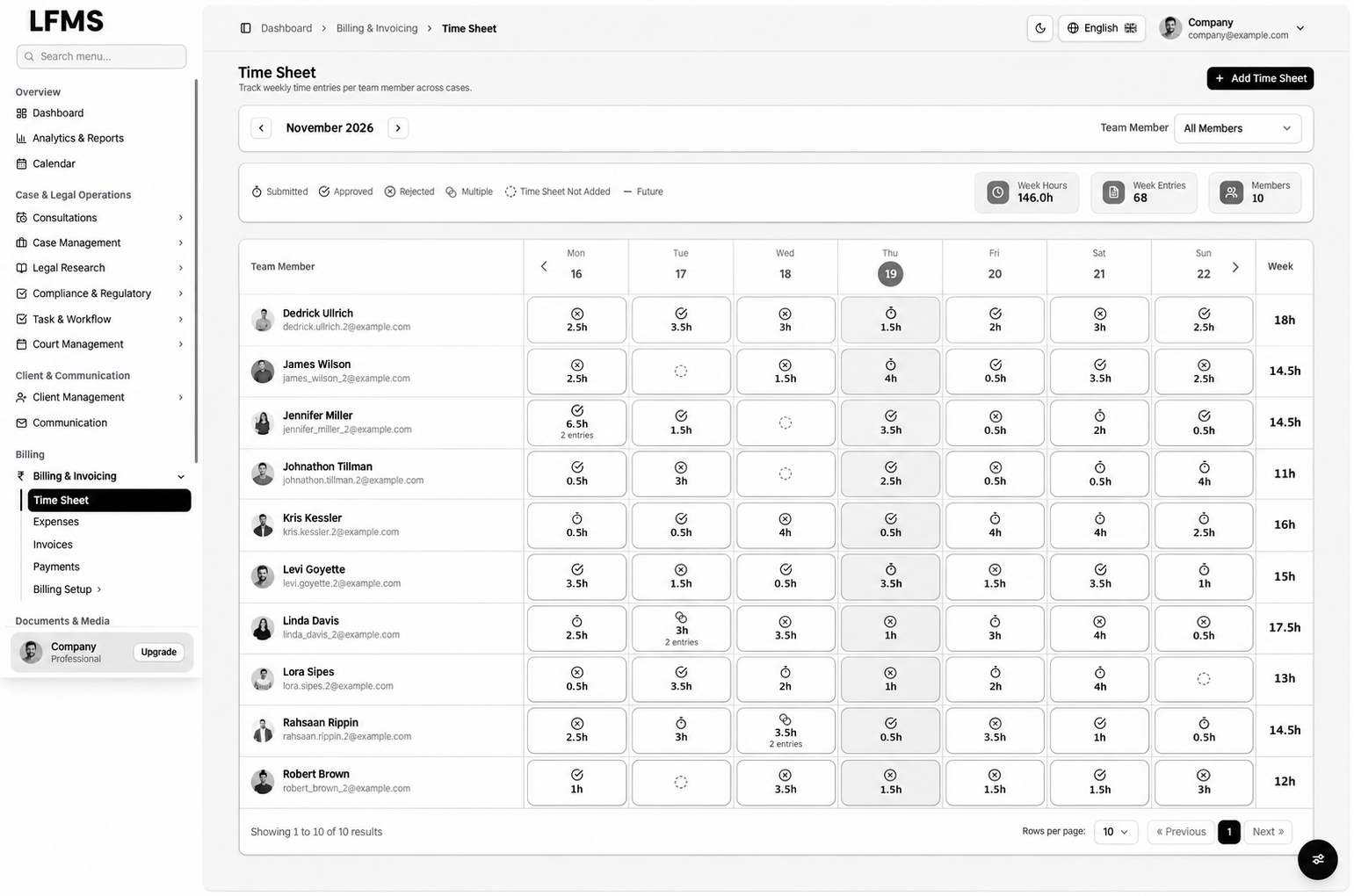
Time sheets: connecting recorded work with review and billing
The weekly time-sheet view brings team members, dates, recorded hours and submission or approval states into a scannable grid. Summary information provides weekly hours and entry counts, while the legend distinguishes review outcomes and missing records.
Law firm billing software development starts before an invoice is created. Our team clarifies who records time, which activities are billable, how entries are reviewed and what happens after a correction. Those rules create a dependable connection between work performed and the information used for billing.
- Weekly work review by team member and date.
- Submission and approval states remain distinguishable.
- Billable-work and correction rules agreed before invoicing is connected.
15 / Inside LFMS
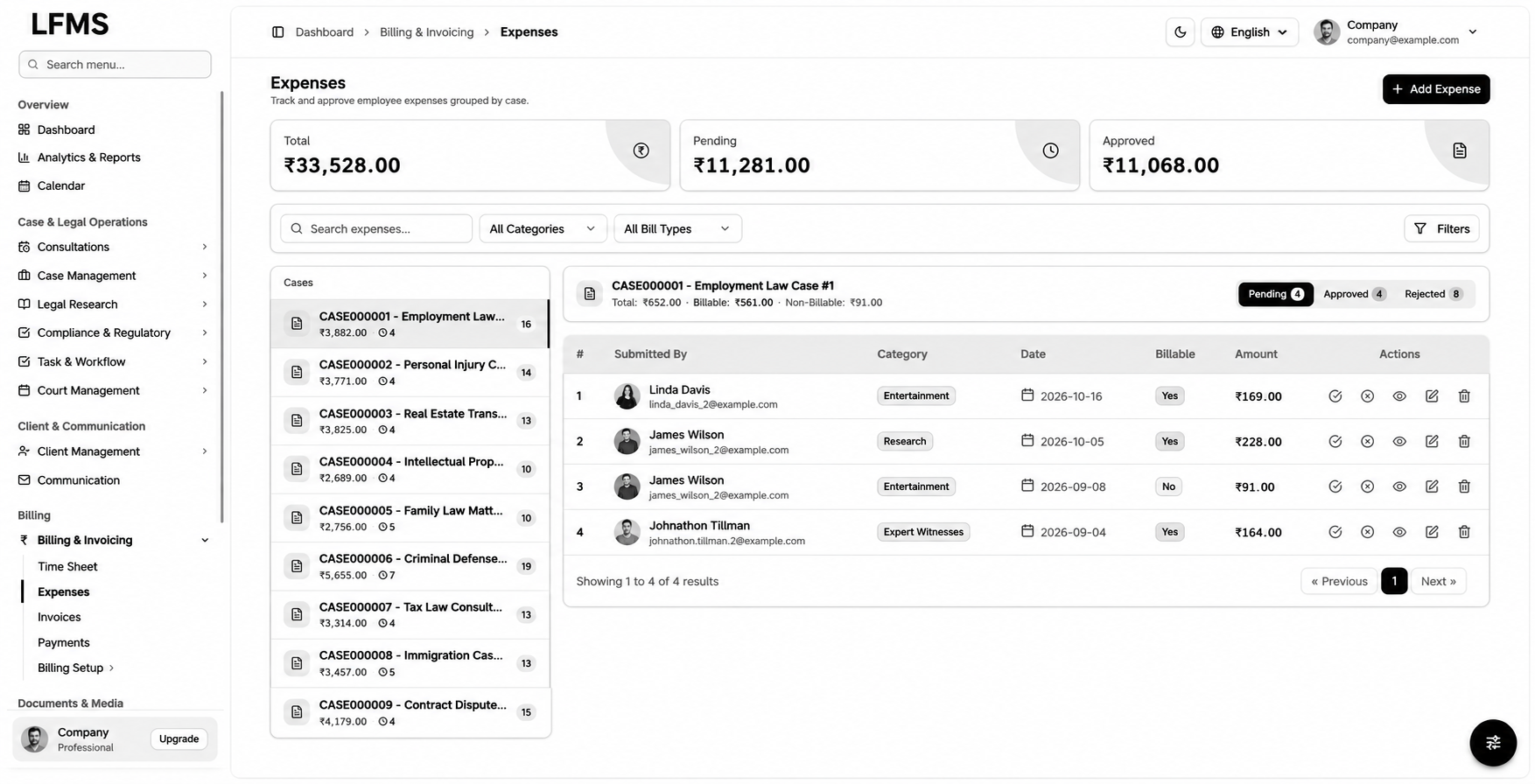
Matter-related expenses with approval and billable distinctions
Expenses combines an overall summary with a case selector and the entries associated with the selected matter. The working table retains the person submitting an expense, category, date, billable classification, amount and available review actions.
Custom law firm software should make the difference between an internal cost and a client-billable expense explicit. Bizzeonline can scope supporting documents, review responsibilities, rejected-entry handling and the handover into invoicing. Currency displays use INR while the sample amounts remain illustrative records.
- Expenses are reviewed with their case context.
- Billable and non-billable costs remain distinguishable.
- Approval responsibilities and supporting evidence can be specified.
16 / Inside LFMS
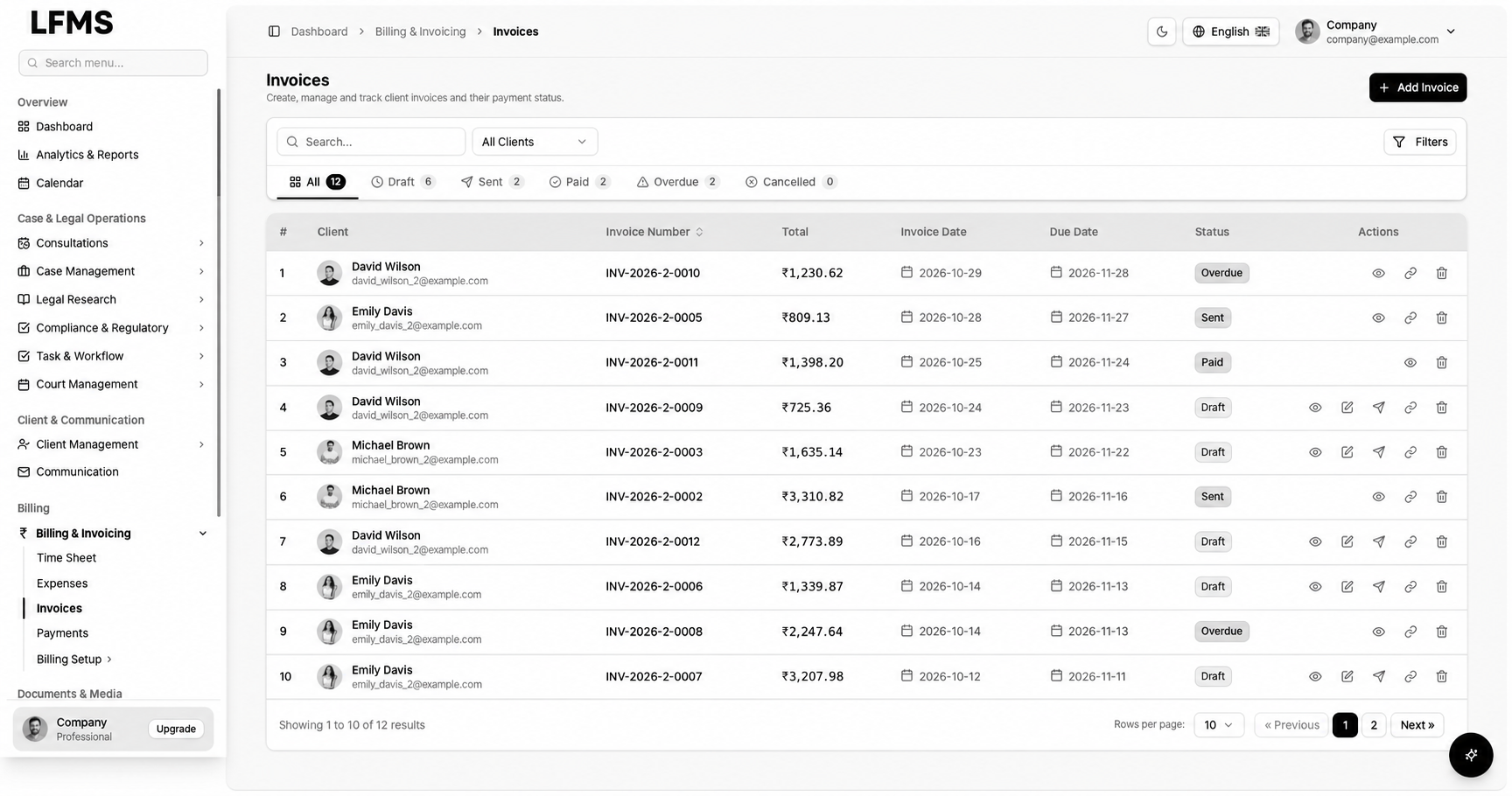
Invoices and payment-state visibility for practice administration
The invoice register brings the client, invoice identifier, amount, invoice date, due date and status together. Filters allow accounts staff to focus on drafts, sent documents, paid invoices or overdue balances without losing the client context.
During legal billing software development, Bizzeonline defines numbering, review, issue and correction rules, together with the sources of time and expense information. Payment gateways, accounting exports and automated reconciliation can be assessed as integration requirements. The register demonstrates invoice administration rather than evidence of a connected live payment system.
- Client invoices with document and due-date context.
- Separate visibility of draft, sent, paid and overdue states.
- Time, expense and external-accounting connections explicitly scoped.
17 / Inside LFMS
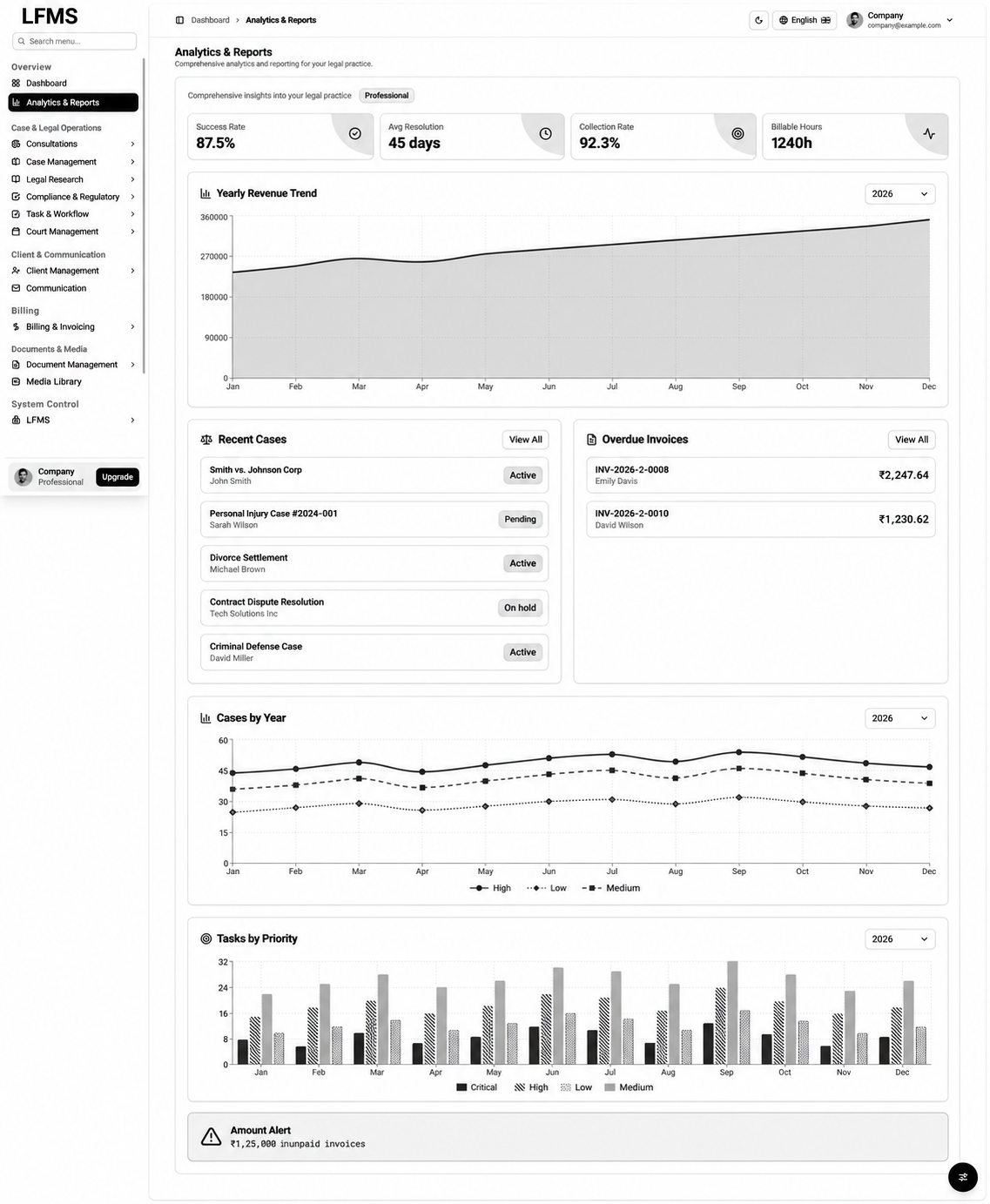
Practice analytics: workload and financial information in context
Analytics & Reports combines practice indicators with revenue trends, recent cases, overdue invoices and workload charts. These views show how managers can move from an overview into the records behind a question instead of relying on isolated headline figures.
Useful reporting requires agreed definitions. Our team establishes which records feed an indicator, which period it covers and who can access the underlying detail. The values in the supplied interface are illustrative, and are not presented as verified client outcomes, case-success claims or measured results delivered by Bizzeonline.
- Workload, revenue and outstanding-invoice perspectives in one area.
- Report definitions and periods agreed with the practice.
- Access to sensitive financial and case information planned by role.
18 / Inside LFMS
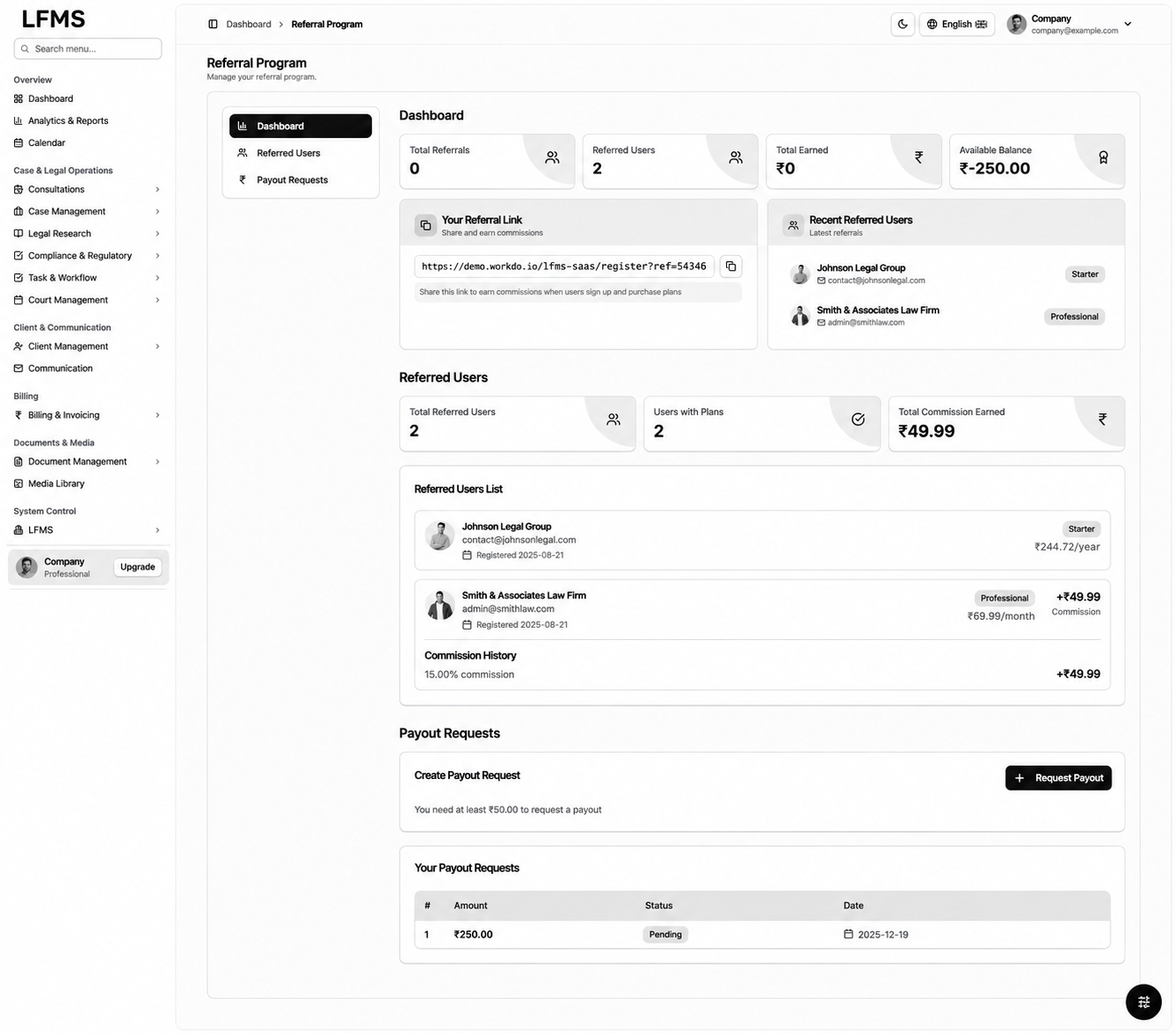
Referral administration for a software platform model
The referral view organises referral-link information, referred users, commission records, balance context and payout requests. It illustrates an additional administration area for a platform offered to multiple participating organisations.
This module has a different purpose from managing an individual legal matter. Bizzeonline would scope eligibility, commission calculation, approval and payment responsibilities separately from the core practice workflow. A firm-specific implementation can omit this module, while a multi-organisation product can include it under an agreed commercial model.
- Referral and payout administration separated from casework.
- Eligibility and approval rules established before automated payments.
- An optional module for a platform operating model.
19 / Inside LFMS
Implementation approach: React.js, Java Spring Boot and PostgreSQL
A suitable implementation approach pairs React.js interfaces with Java Spring Boot APIs and PostgreSQL for structured matter, task and billing records. Document storage can remain separate from relational data while retaining authorised links to the appropriate client or case. These technologies describe a proposed approach for the demonstrated scope, rather than a verified production stack.
Bizzeonline can define clear boundaries for identity, consultations, casework, research, documents and billing. Microservices are appropriate when workload and team ownership justify independent deployment; a modular first release can preserve the same domain boundaries with less operational complexity.
- Structured APIs and validation around each business workflow.
- Consistent references between cases, tasks, documents and billing.
- Architecture sized to the practice and its support requirements.
20 / Inside LFMS
AWS operations, confidentiality and DevOps delivery
An AWS implementation can combine application services, managed PostgreSQL, controlled object storage and background jobs for reminders, reports and exports. Scaling decisions should follow measured workload and database behaviour, with heavier tasks separated from interactive casework where appropriate.
Our delivery approach includes CI/CD checks, server-side authorisation, audit events for sensitive actions, staging validation and controlled releases. Backups, restore exercises, logging, monitoring and incident responsibilities belong in the operating plan. These controls support a dependable service without making unverified availability or security-certification claims.
- Role and matter-level access enforced on the server.
- Background processing for reminders, reports and document operations.
- Automated checks, backups, monitoring and rollback planning.
21 / Inside LFMS
Plan your legal firm management software with Bizzeonline
Start with how your practice receives enquiries, assigns advocates, manages matters, schedules hearings and prepares bills. Share your current tools, document structure, approval responsibilities and the work that repeatedly requires manual coordination.
Bizzeonline can turn that brief into a practical legal firm management software development scope: priorities, integrations, access rules, migration requirements and acceptance checks. A focused first release can establish the core casework journey, with research, compliance or wider platform modules added in a planned sequence.
- Discuss the workflow from consultation to casework and billing.
- Agree a first release with clear acceptance criteria.
- Plan migration, integrations and ongoing support with the delivery team.
LFMS implementation approach
Questions about this project
Can Bizzeonline develop software around our law firm’s workflow?
We can map your consultation, case assignment, hearing, document and billing processes into a custom legal firm management software brief.
Can the system connect with our existing tools?
Calendar, accounting, payment and document integrations can be assessed against available interfaces, data ownership and access requirements during discovery.
Can access be restricted by role or matter?
Role and matter-level permissions can be included in the design, with server-side authorisation and audit events for sensitive actions.
Can we start with case management and add other modules later?
Yes. A phased scope can prioritise the consultation-to-case workflow, followed by research, billing or other agreed modules with clear acceptance checks.
Interface illustrations are adapted from supplied Advocate SaaS screens with LFMS branding. Architecture describes an implementation approach; production rollout and measured client outcomes are not documented here. About the team.