01 / Inside JSGCRM
JSGCRM overview: a connected sales and customer workspace
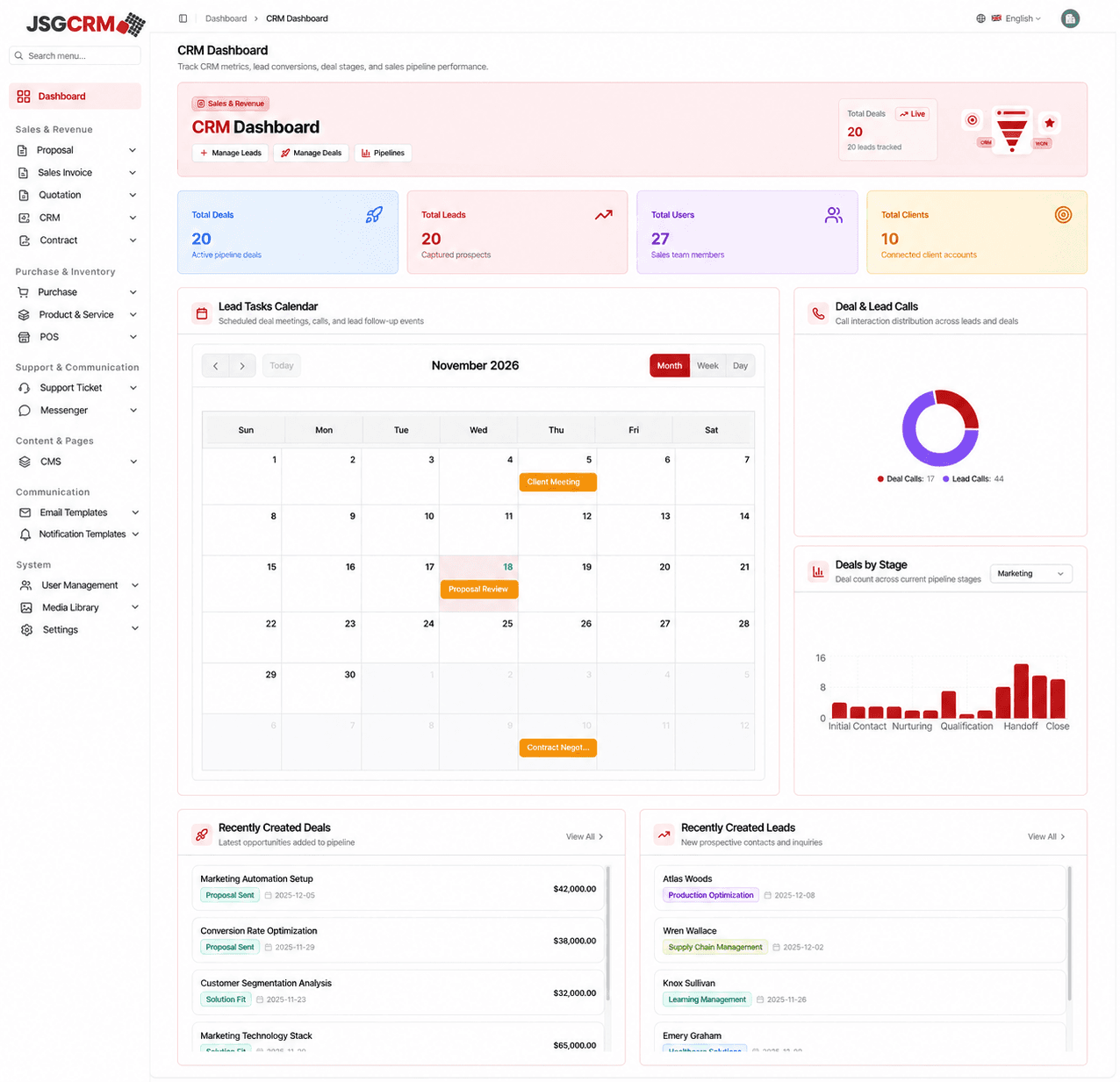
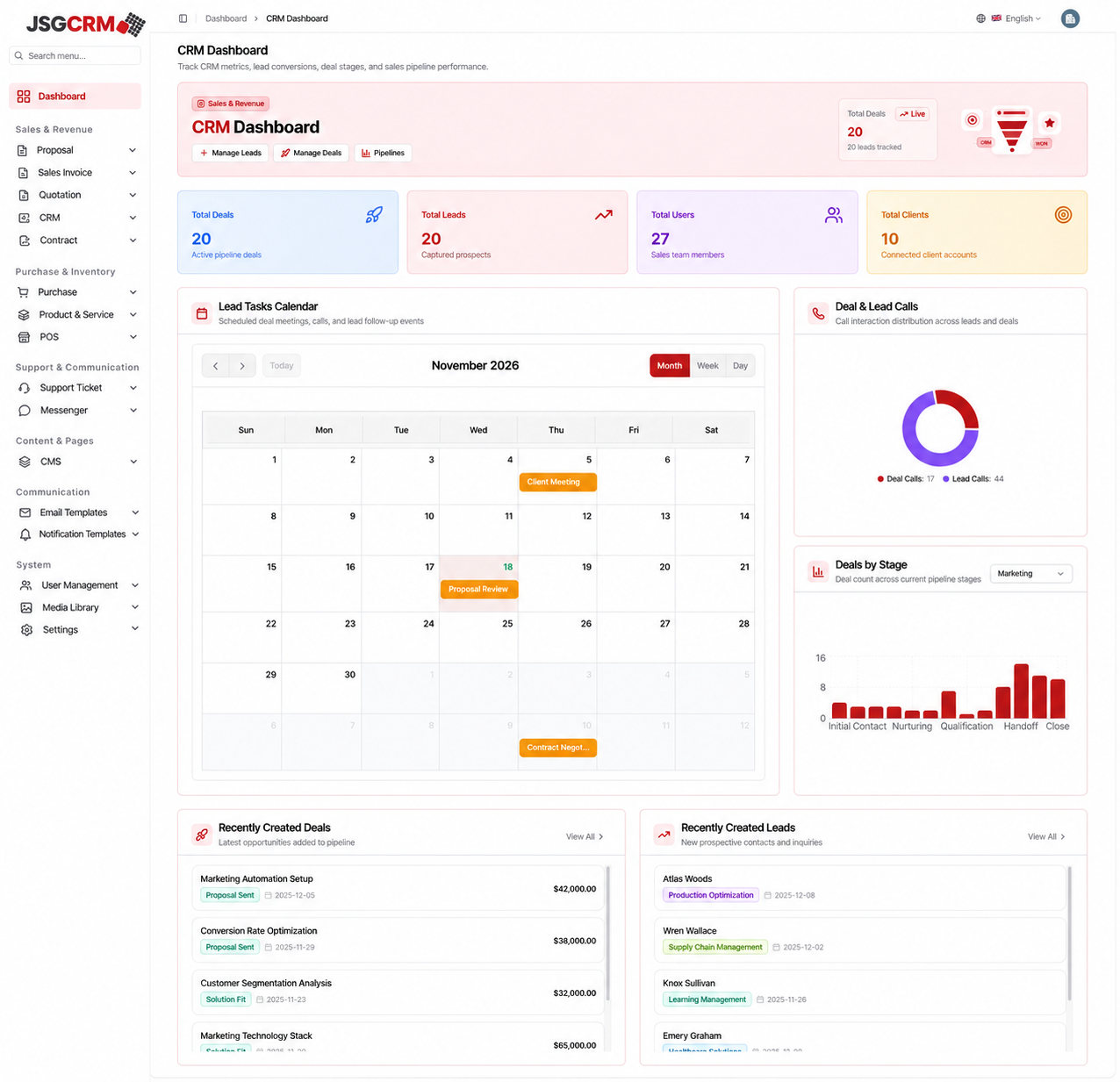
JSGCRM brings leads, opportunities, customer communication and commercial documents into one sales workspace. From the first enquiry to a quotation, invoice or contract, the experience keeps the customer relationship and the next action connected. Managers get an overview of the pipeline while sales teams can work through individual records without losing context.
For businesses considering custom CRM development, the value lies in how closely the system fits the way the team sells. Bizzeonline helps define those workflows, connect the right information and plan a practical CRM around ownership, follow-up and everyday usability.
- Keep customer context and commercial follow-up within the same workspace.
- Separate dashboard navigation from the CRM module and its working views.
- Use a consistent JSG red identity, with secondary chart colours for readability.
- Industry
- Manufacturing, Enterprise Software
- Services / expertise
- CRM Development · Software Development · Sales Automation · Java Spring Boot · React.js · AWS Architecture
- Project focus
- CRM development and custom software development
- Core workflows
- Leads, deals, proposals, quotations, invoices and contracts
- Implementation approach
- React.js, Java Spring Boot, PostgreSQL and AWS
Planning a similar project? Explore our custom software development services.
02 / Inside JSGCRM
The operational challenge: connecting enquiry to commercial action
Sales teams lose time when lead details sit in spreadsheets, follow-ups stay in personal inboxes and quotations live in separate folders. A manager may know an opportunity’s value without knowing who owns the next conversation. A colleague taking over an account may need to reconstruct its history before moving forward.
The JSGCRM workflow connects customer records, tasks, commercial documents and reporting in a consistent structure. Our approach to CRM software development starts with those handovers: who captures an enquiry, how it is qualified, when an opportunity advances and which information the next person needs.
- Lead ownership and follow-up visibility.
- Consistent document review and commercial status.
- Pipeline configuration and reporting from a shared record structure.
03 / Inside JSGCRM
Proposal management and the handover to invoicing
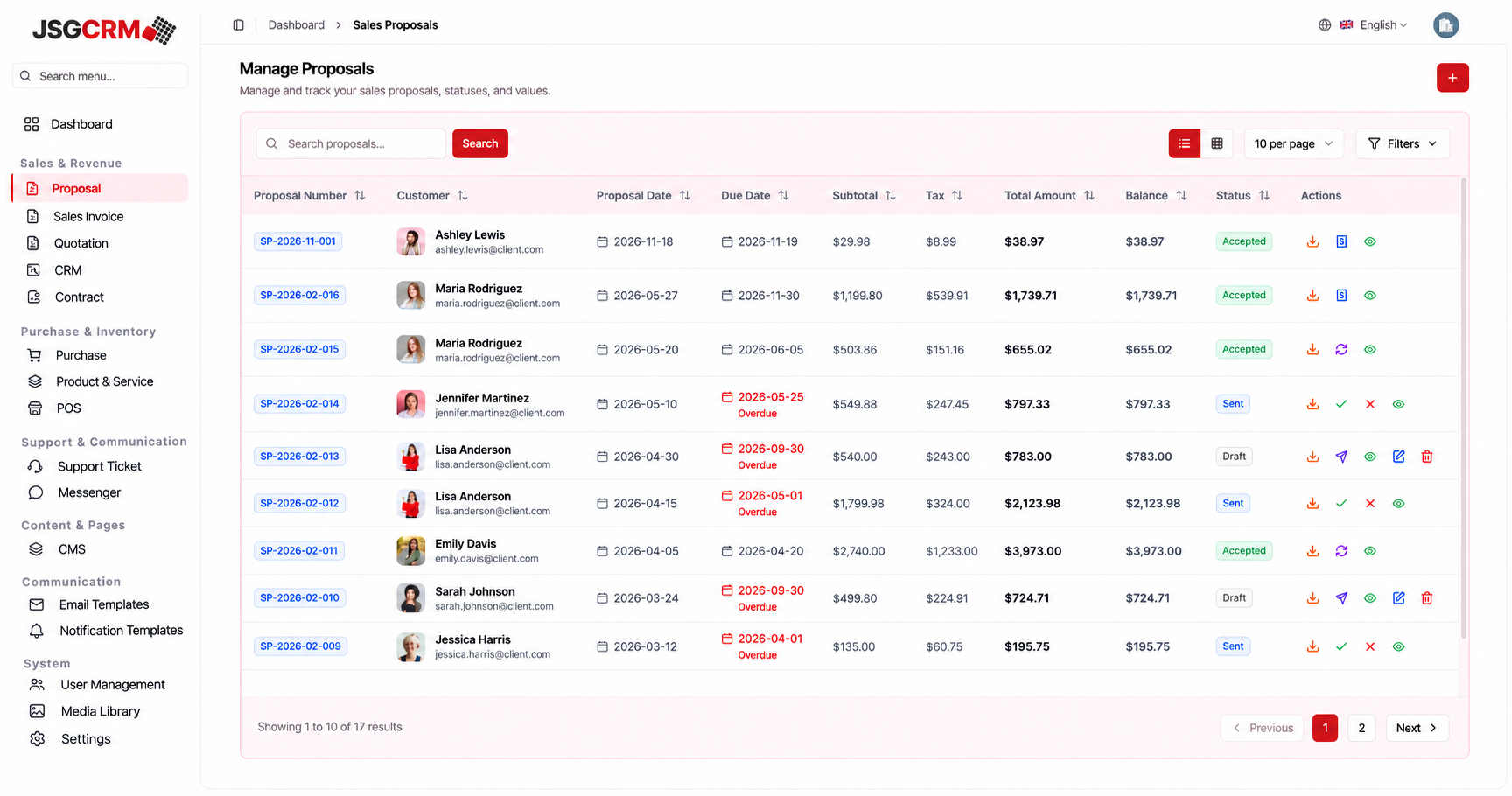
Proposal management brings customer details, proposal and due dates, commercial totals, balance and status into a searchable register. Sales staff can find the right document, review its position and take the next action from the same workspace. Clear draft, sent and accepted states make the proposal easier to follow across the team.
The document detail brings items, tax, customer information and review actions together. An accepted proposal can be followed into the invoicing journey, keeping the original agreement visible. When planning sales CRM development, Bizzeonline maps these document handovers so that teams spend less time copying information between tools.
- Review customer, items and commercial totals before approval.
- Retain a traceable relationship between proposal and invoice.
- Keep proposal review within the sales workspace.
04 / Inside JSGCRM
Quotations with customer, item and pricing context
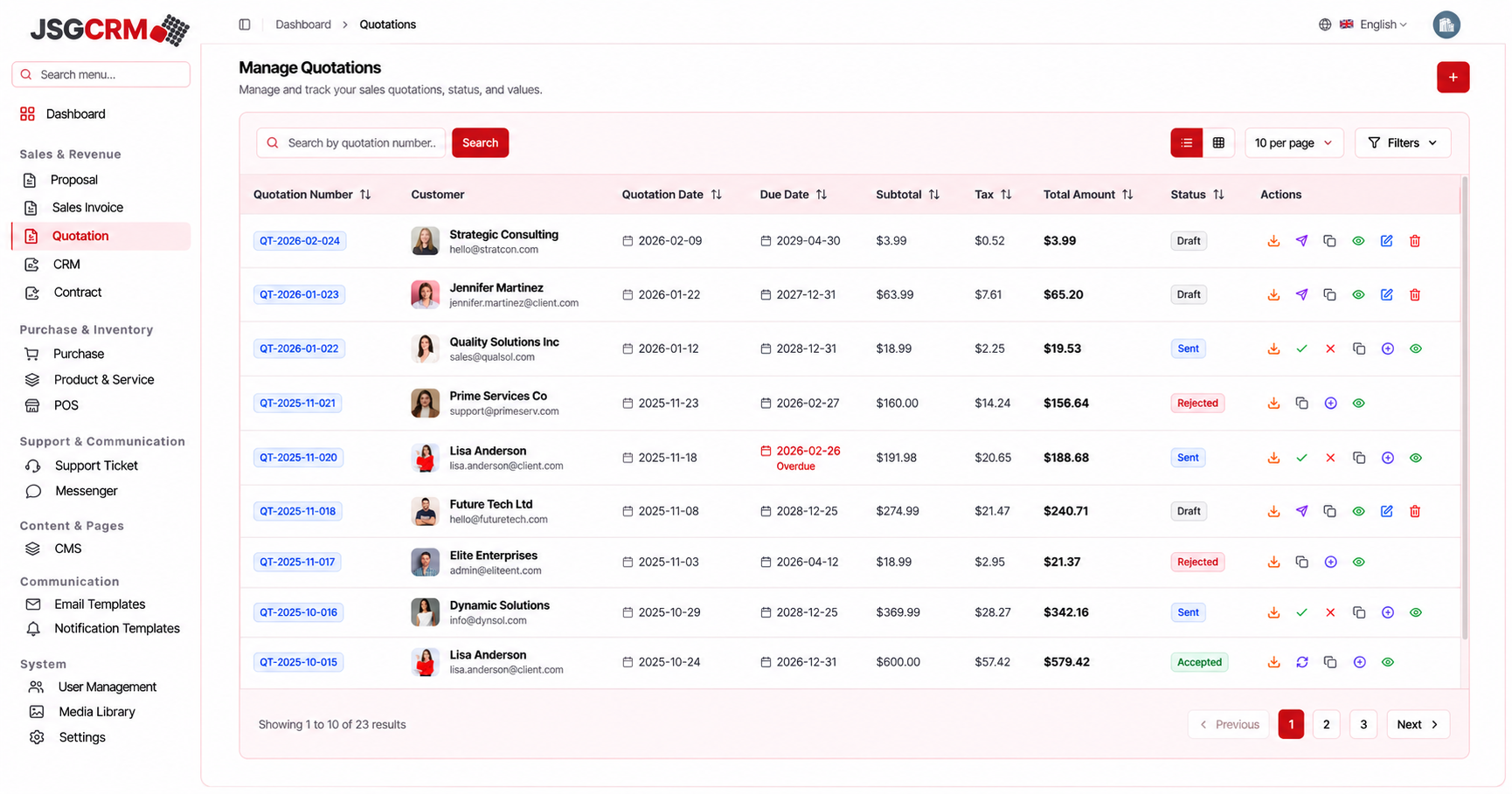
A quotation needs to communicate more than a price. It should preserve the customer, products or services, quantities, discounts, tax, payment terms and due date in a clear document. JSGCRM groups those details into an offer view supported by a searchable quotation register.
This structure helps the sales team review commercial terms before sharing an offer and return to the same record when a customer requests a revision. For a custom CRM project, our team defines quotation fields, approval responsibilities and document rules around the business’s actual sales process.
- Keep quotation terms and warehouse context visible during review.
- Provide a document download alongside the saved record.
- Move between offers without losing the current sales context.
05 / Inside JSGCRM
Sales invoices: balances, document status and review actions
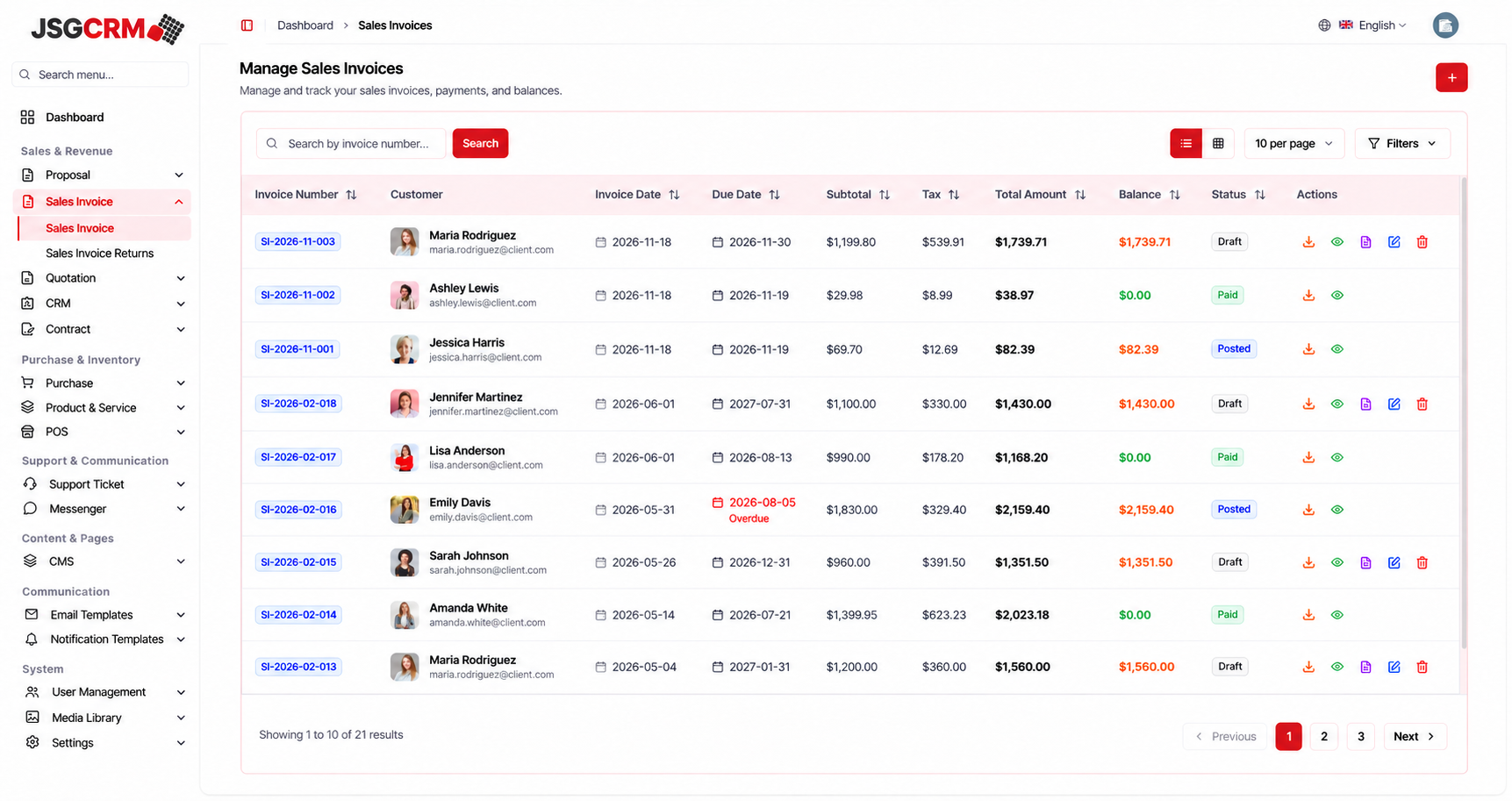
Invoice management connects commercial documents with customer details, payment position and operational context. The overview makes totals, balances, dates and document states easy to scan. The detail view brings billing and shipping information, line items, warehouse and terms into the review process.
Custom CRM software should make the difference between reviewing, posting and settling a document clear. Bizzeonline can scope these workflows alongside existing accounting or payment systems, defining which platform owns each record and how updates move between them. That planning helps avoid duplicate entry and unclear document status.
- Show draft, posted and paid documents with distinguishable labels.
- Separate review and download from the state-changing Post Invoice action.
- Separate invoice review and returns within one sales-document area.
06 / Inside JSGCRM
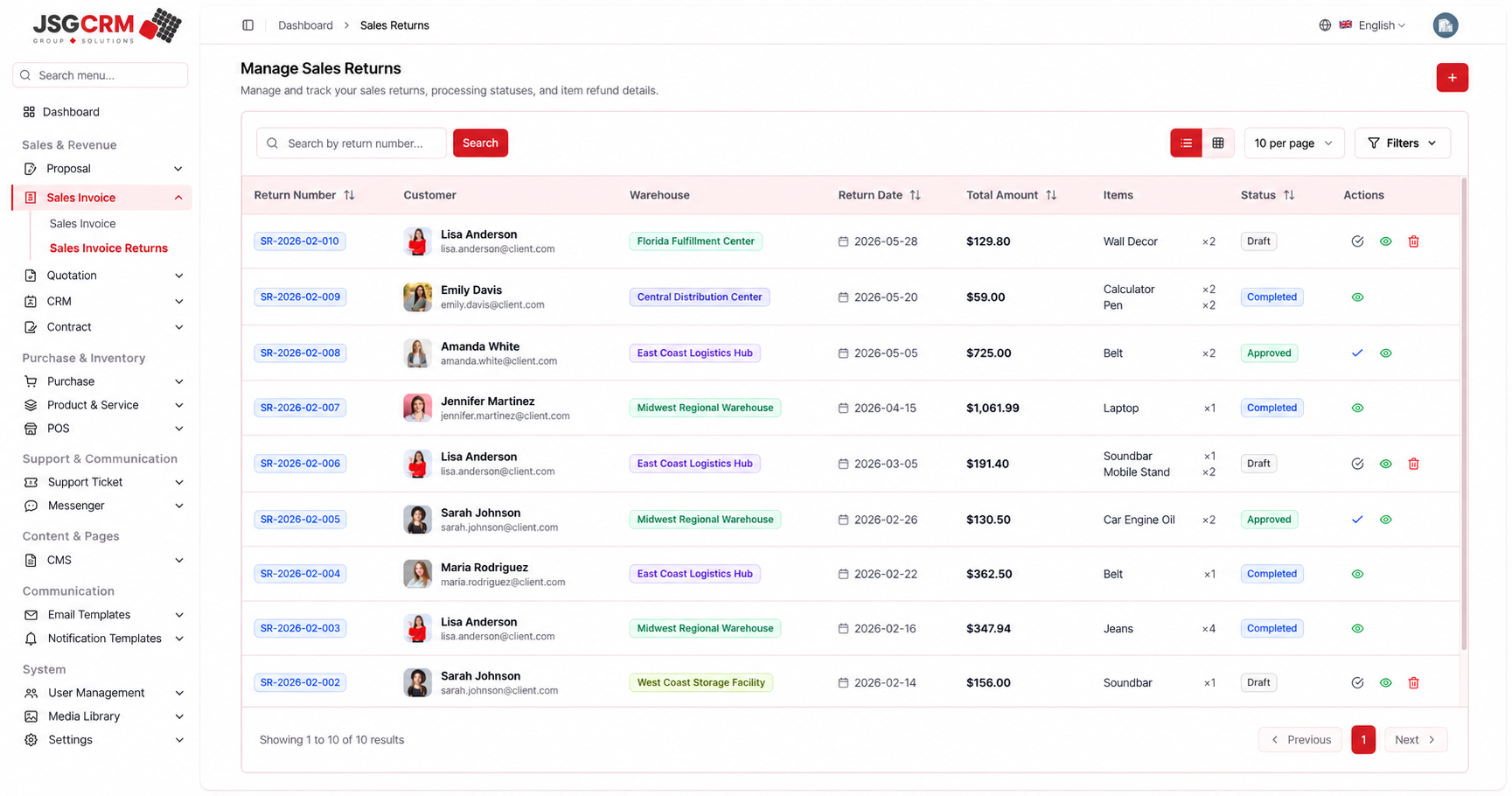
Sales returns with line-level and approval context
Returns need their own review process rather than being treated as an unexplained change to an invoice. JSGCRM separates return numbers, customers, warehouse, returned items, date, amount and processing status. The detail page places item-level information beside the approval action.
For businesses with physical goods, this provides a useful starting point for connecting sales, stock and customer support. During CRM development, our team clarifies return eligibility, approval ownership and the required inventory or accounting handover so the workflow reflects how the business handles real exceptions.
- Review the customer, warehouse and returned items together.
- Keep draft, approved and completed states explicit.
- Keep return status separate from invoice payment status.
07 / Inside JSGCRM
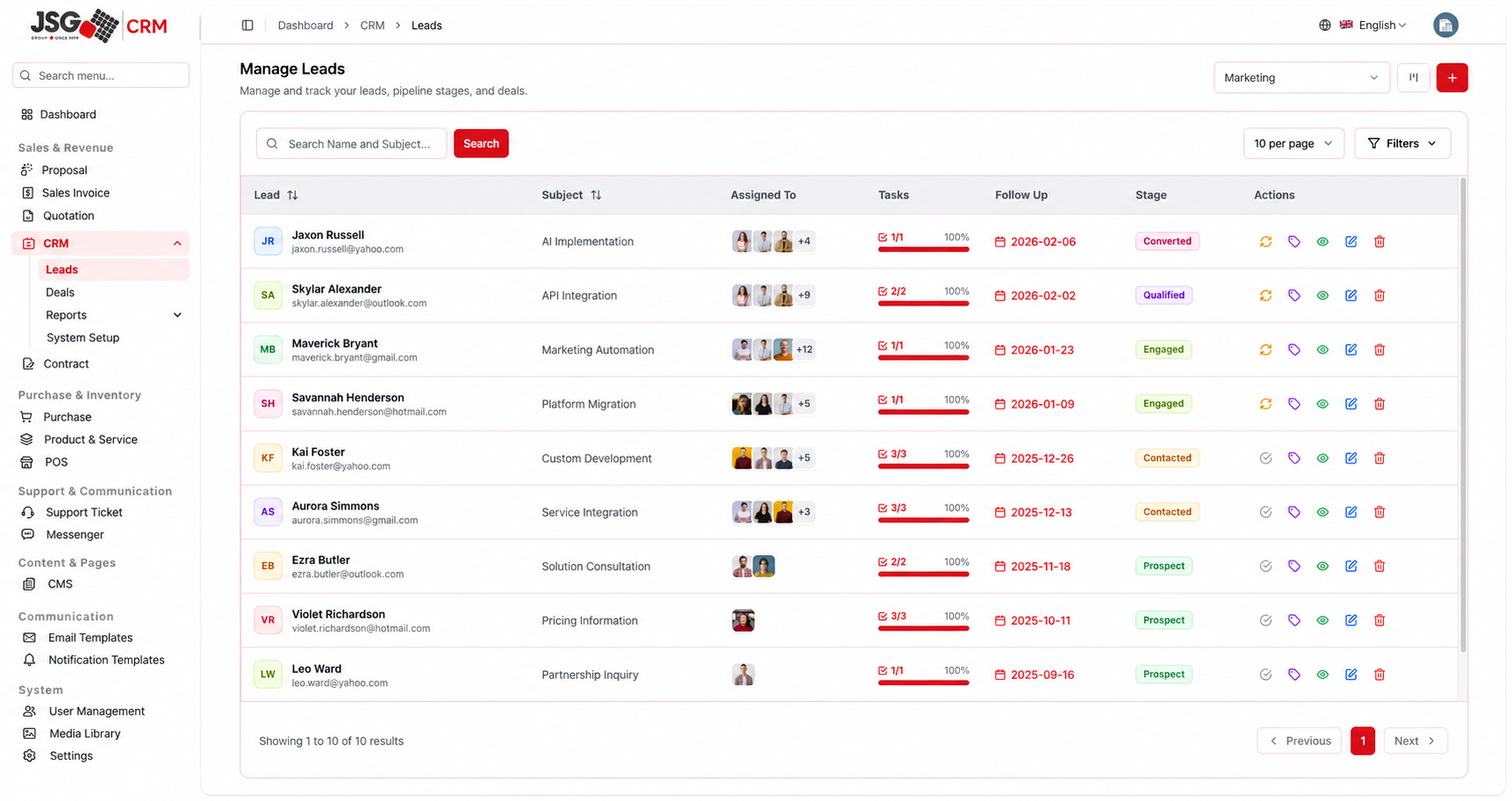
Lead management: ownership, stages and follow-up
Lead management connects a prospect with an owner, enquiry subject, task progress, follow-up date and pipeline stage. Search and pipeline selection help sales staff concentrate on the records that need attention. The lead becomes an active working record rather than a name that is captured and forgotten.
The detail view brings notes, conversations and supporting information together through focused tabs. This is central to lead management CRM development: the salesperson should be able to understand the customer, identify the next action and continue the conversation without searching across unrelated applications.
- Keep the lead’s owner and follow-up date visible.
- Group notes and communication around the selected record.
- Distinguish pipeline stage from task-completion status.
08 / Inside JSGCRM
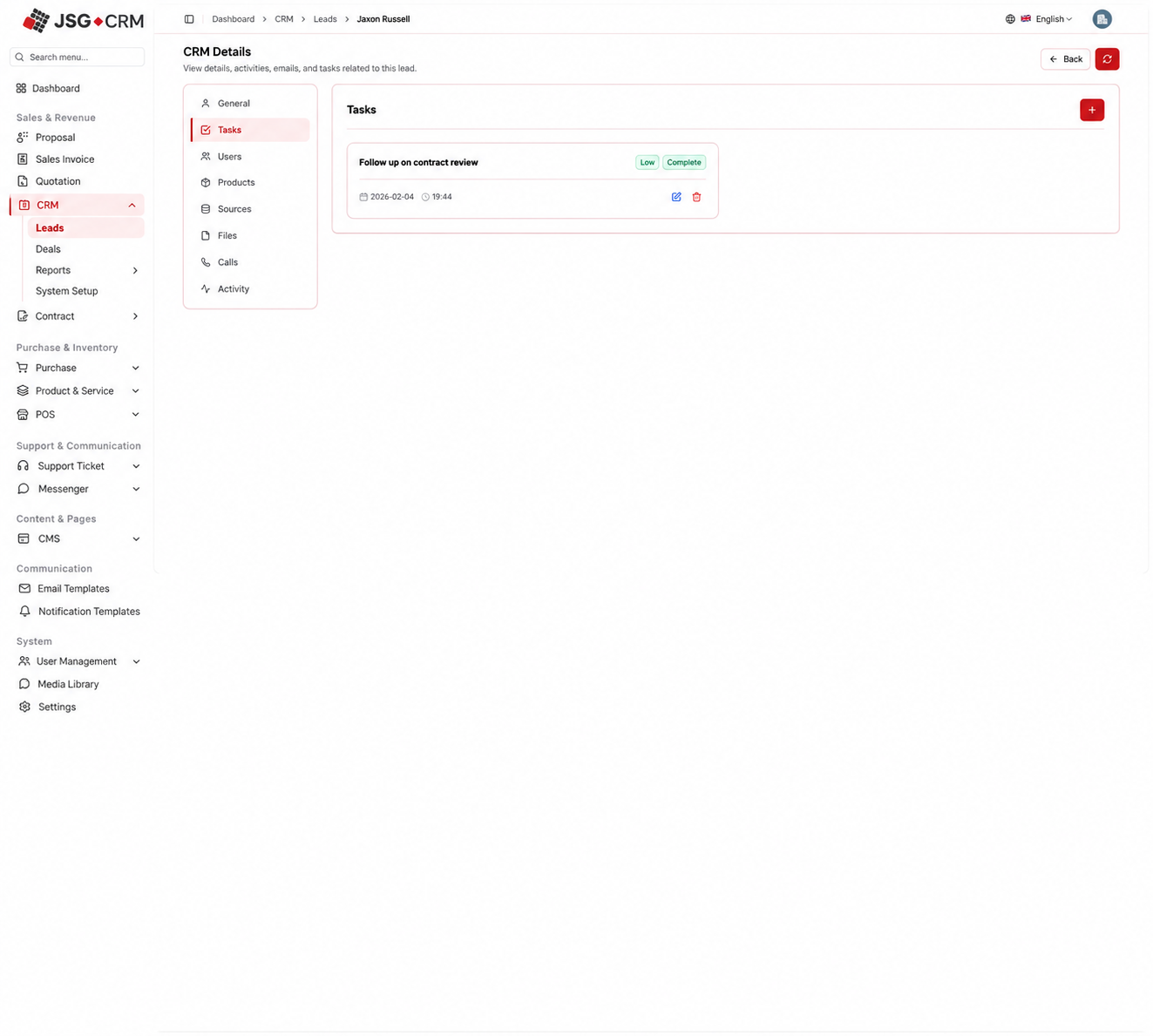
Tasks and assigned users: making ownership practical
Tasks turn a sales intention into a specific action with a priority and completion state. Keeping a follow-up attached to its lead makes the context visible when work is reviewed or reassigned. The associated Users view shows the people participating in the customer relationship.
Bizzeonline’s CRM planning connects task ownership with team responsibilities. Lead owners, supporting colleagues and managers may need different access and escalation paths. Defining those rules early helps a CRM become useful for day-to-day teamwork rather than another place to maintain a duplicate to-do list.
- Use explicit task status and priority labels.
- Keep assignment changes auditable.
- Switch between task ownership and lead participants within the record.
09 / Inside JSGCRM
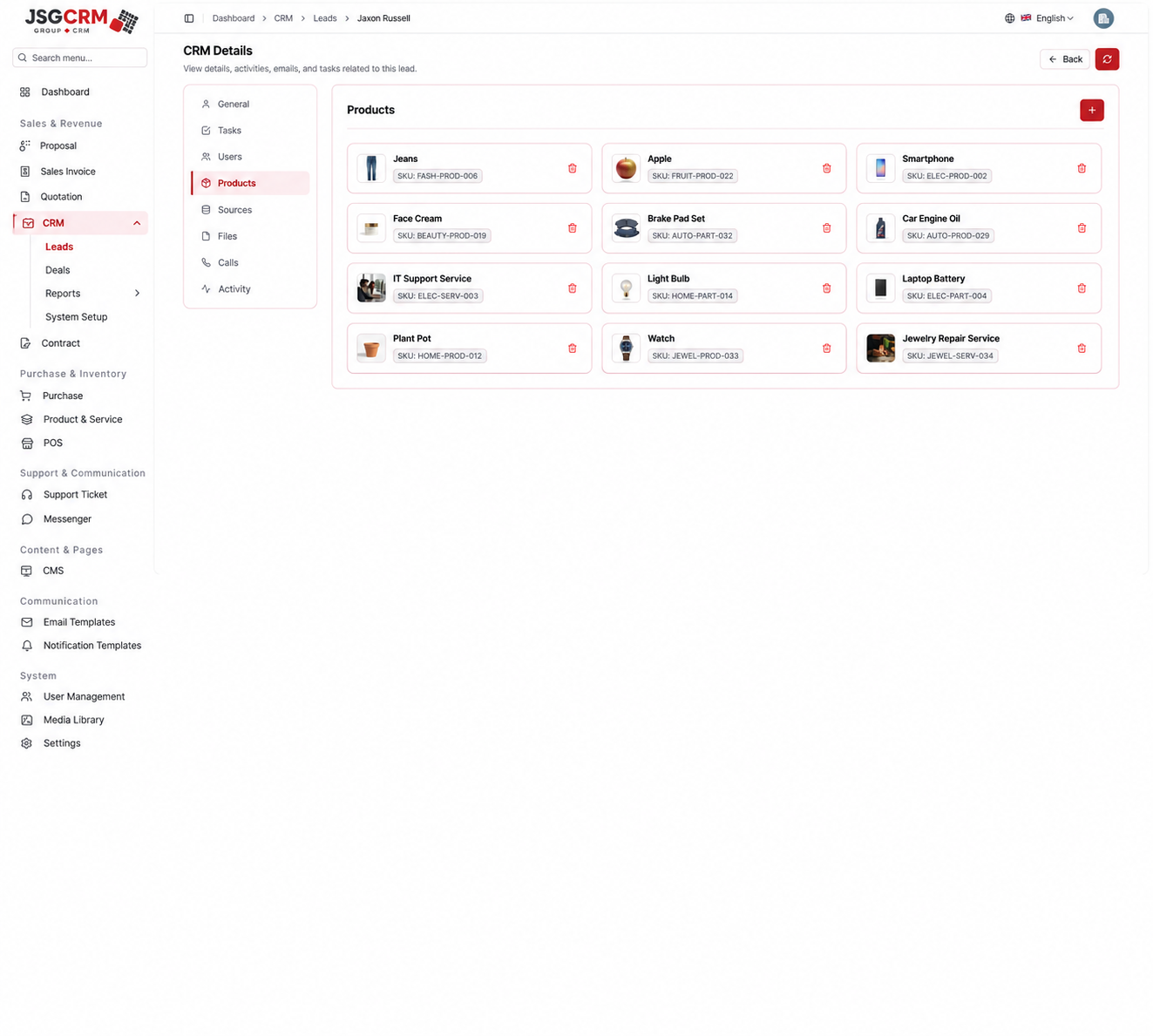
Products and lead sources: connecting intent with acquisition
Product associations help sales staff understand what a prospect is evaluating. The Products view keeps catalogue names and SKU references attached to the lead. The Sources view records acquisition channels such as the website contact form, referrals, social activity, campaigns and direct outreach.
Together these details connect customer intent with acquisition context. A custom sales CRM can use consistent product and source records across lead capture, follow-up and reporting. Bizzeonline helps determine which fields matter to the business and how they should connect with existing websites, catalogues and enquiry forms.
- Keep product interest attached to the customer record.
- Use consistent source names across capture and reports.
- Separate lead-specific associations from administrator configuration.
10 / Inside JSGCRM
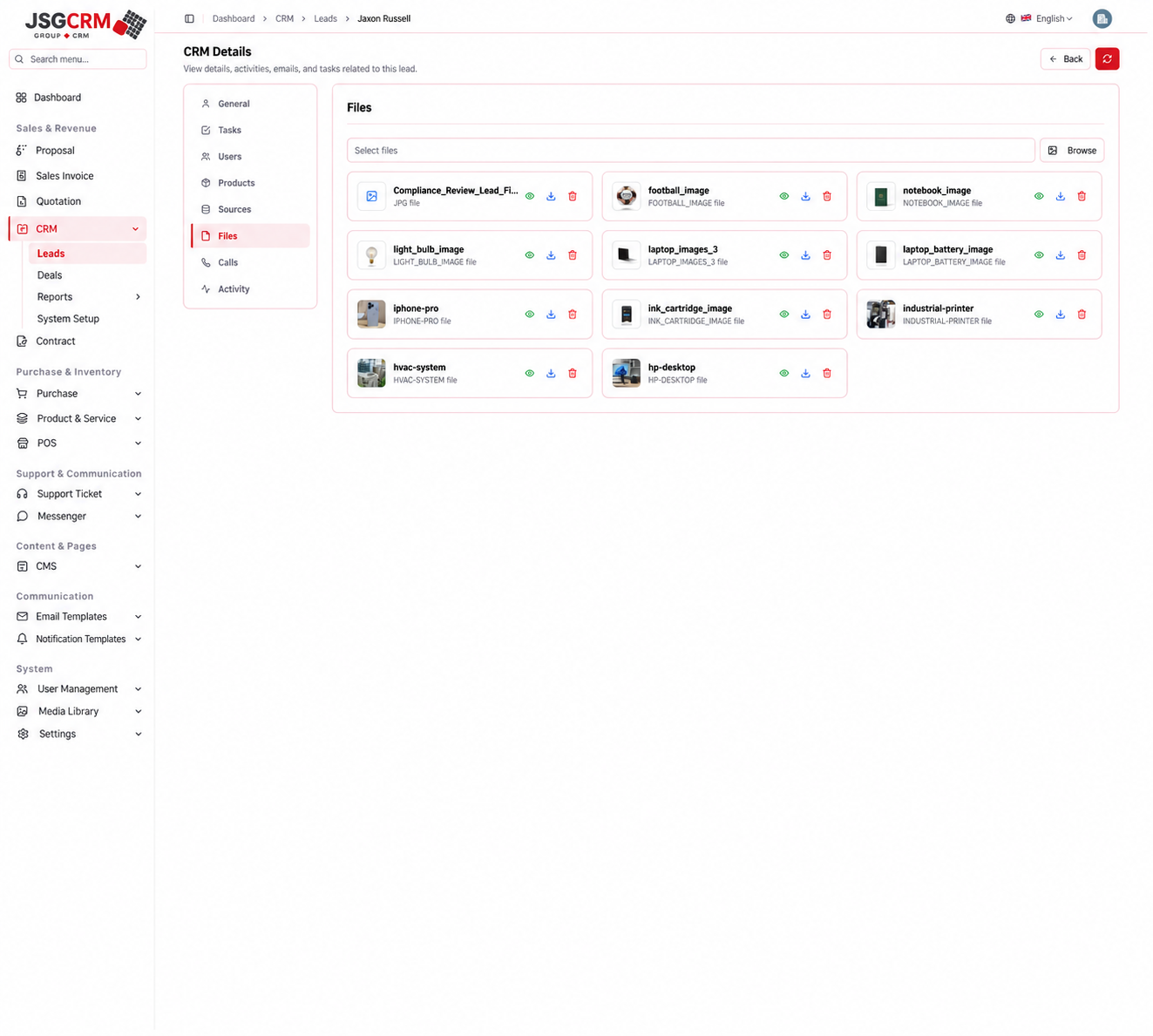
Files, calls and a readable activity history
Customer relationships carry more information than a single notes field. JSGCRM separates supporting files, inbound and outbound calls, interaction results and a chronological activity history. A colleague can review documents and previous actions before taking over the next conversation.
For CRM application development, these views support continuity across a growing team. Our planning covers document access, communication history and the changes that should appear in an activity trail. The aim is a practical customer record that helps people act with context instead of asking the customer to repeat information.
- Keep documents and communication attached to the selected lead.
- Make the latest changes understandable during team handovers.
- Use a shared activity history to support team handovers.
11 / Inside JSGCRM
Deal management: commercial context beyond the lead
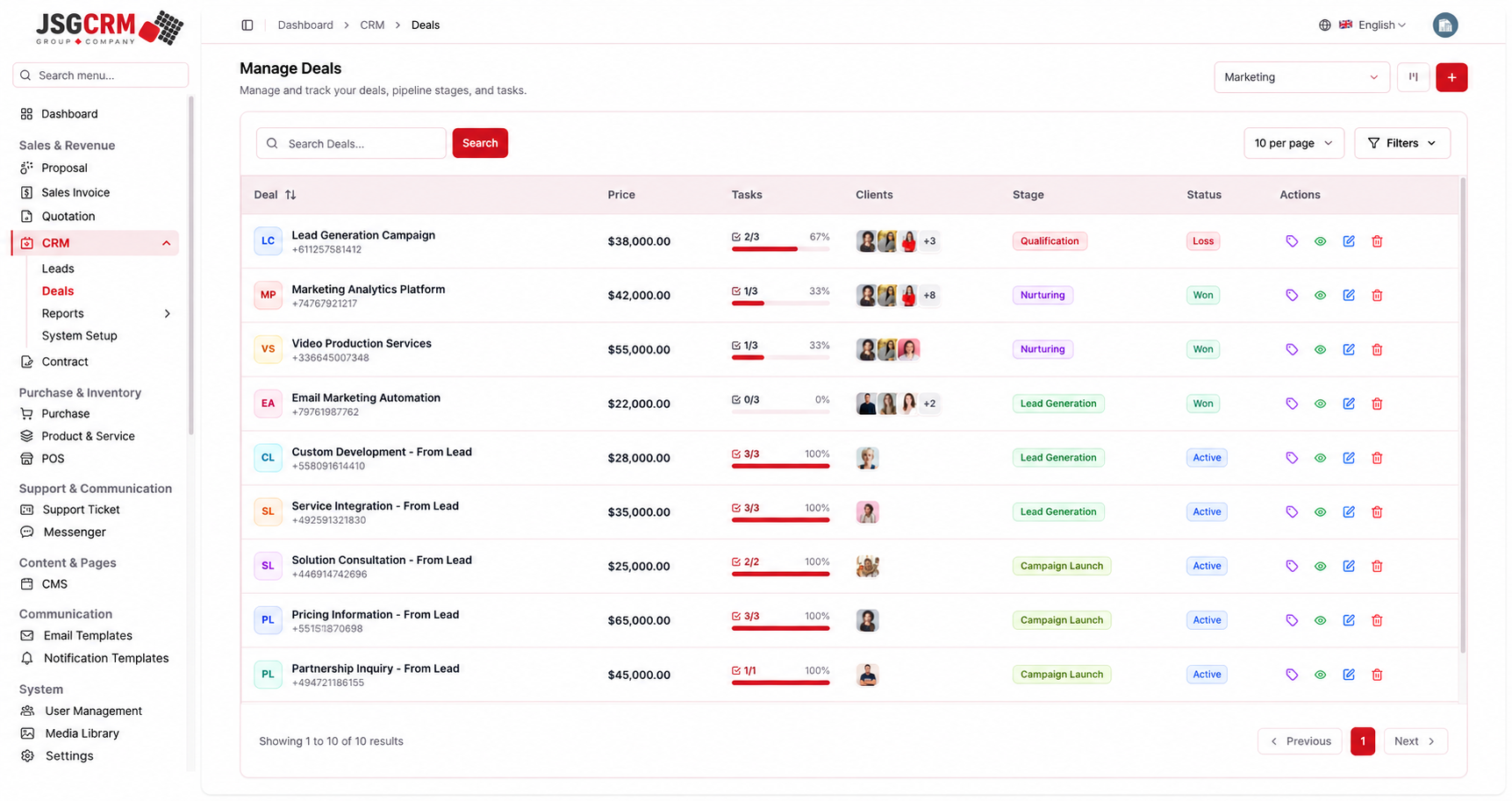
Deal management adds commercial context to the customer relationship: opportunity value, stage, status, tasks and client associations. The overview supports pipeline review, while the detail page brings notes, conversations and supporting product or source information into the opportunity workspace.
Bizzeonline approaches sales automation around clear definitions. A pipeline stage explains where an opportunity stands; its outcome explains how it closed. Mapping that distinction, the qualification handover and the next action helps a custom CRM support a team’s sales process without forcing every opportunity through an unsuitable workflow.
- Keep opportunity context and follow-up in the same workspace.
- Define stage transitions and close reasons during discovery.
- Keep opportunity review separate from lead intake and system configuration.
12 / Inside JSGCRM
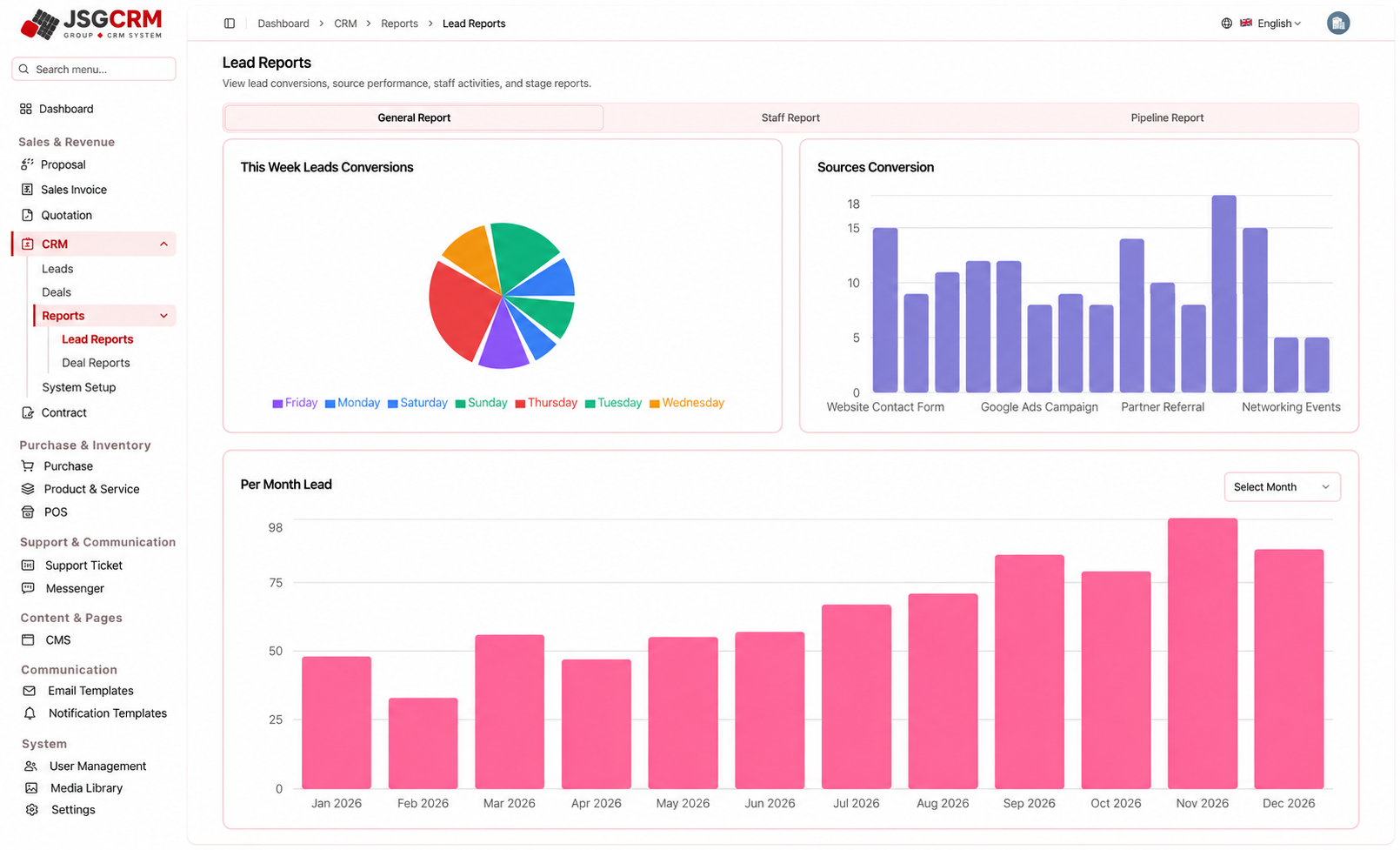
Lead and deal reports for sales review
Lead and deal reports bring customer activity into a management view. Weekly distributions, acquisition-source comparisons, monthly volumes and pipeline perspectives help frame sales reviews. The reporting area separates lead analysis from opportunity analysis while keeping both connected to the working CRM.
Useful CRM reporting starts with agreed definitions. Our team works through what counts as a qualified lead, a conversion, an open opportunity or a closed deal before planning the dashboard. That gives a software development engagement a clearer reporting brief and helps avoid figures that look impressive but mean different things to different teams.
- Use source and pipeline comparisons to frame review discussions.
- Keep report filters and reporting periods explicit.
- Move from the reporting area to either lead or deal analysis.
13 / Inside JSGCRM
Configurable pipelines and lead stages
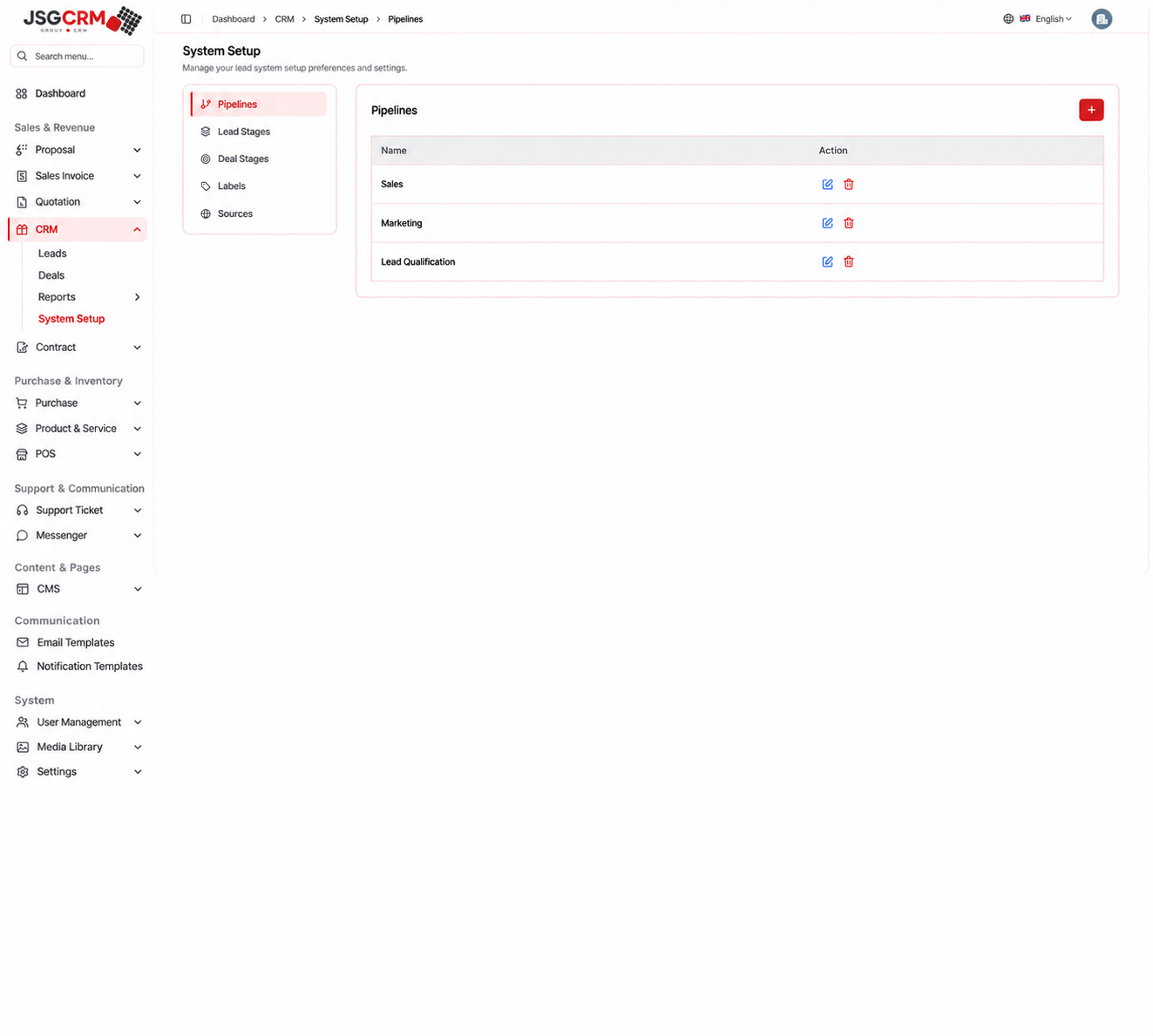
Pipeline configuration allows marketing, lead qualification and sales activity to follow different sequences. JSGCRM groups pipeline names and ordered lead stages within System Setup, separating administration from the daily task of working through customer records.
This flexibility matters when a business changes its sales process or introduces another team. During custom CRM development, Bizzeonline defines which settings administrators can manage, how records retain their history and how changes should carry through to working views and reporting. Configuration should support the operation without making it difficult to govern.
- Configure pipelines without mixing them with dashboard navigation.
- Keep internal Setup navigation separate from the main sidebar.
- Group configuration controls in a dedicated System Setup area.
14 / Inside JSGCRM
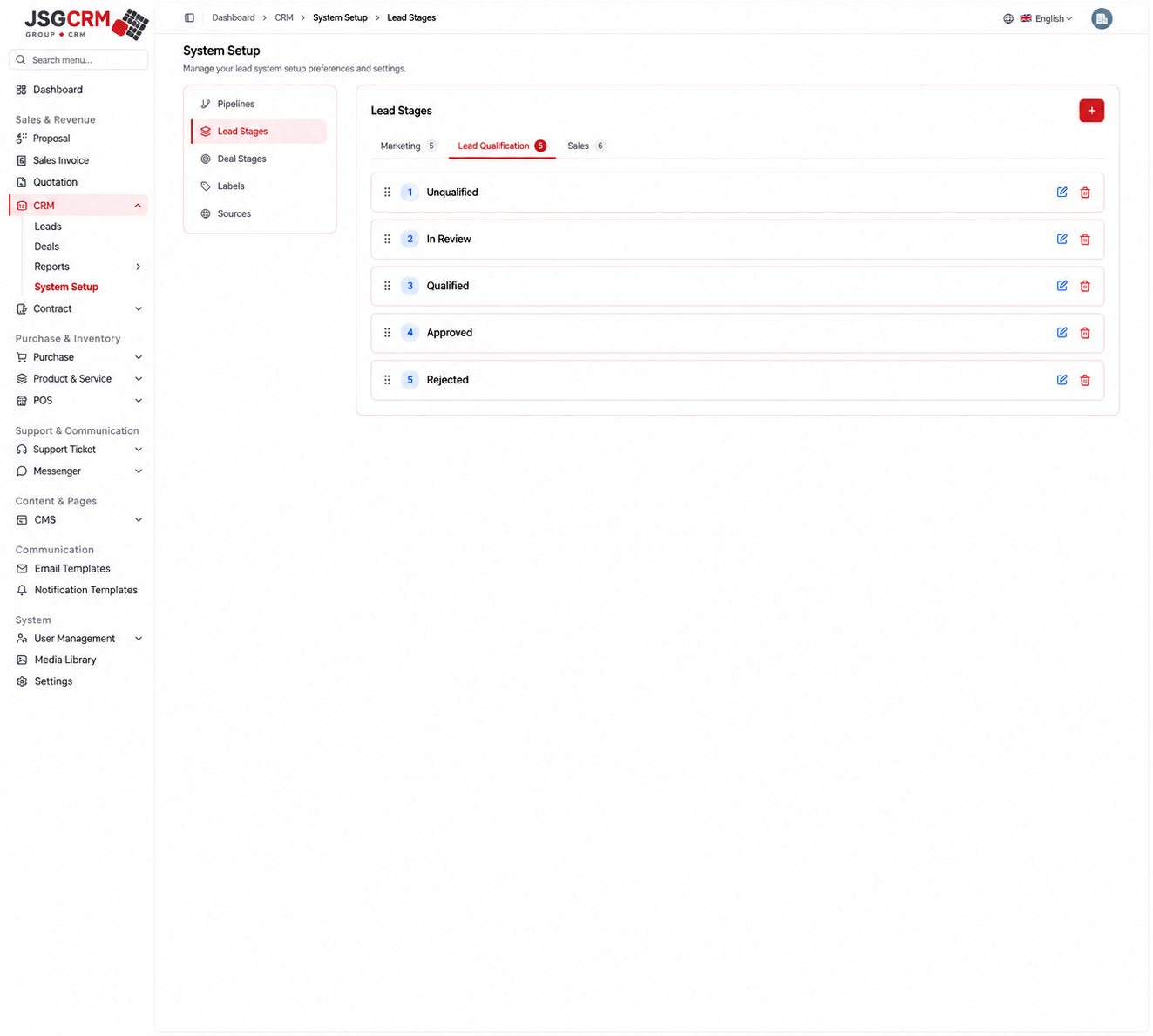
Lead qualification and sales-stage configuration
Qualification and sales workflows need different decision points. A qualification sequence can move through review and approval, while a sales document may pass through draft, sent, revised and accepted states. Giving each workflow its own structure keeps the meaning of a stage clear.
Our CRM development process considers how staff use those stages in practice: what information is required to move forward, who can change the state and what should happen when a customer reopens the conversation. The result is a more precise implementation brief than a generic list of status labels.
15 / Inside JSGCRM
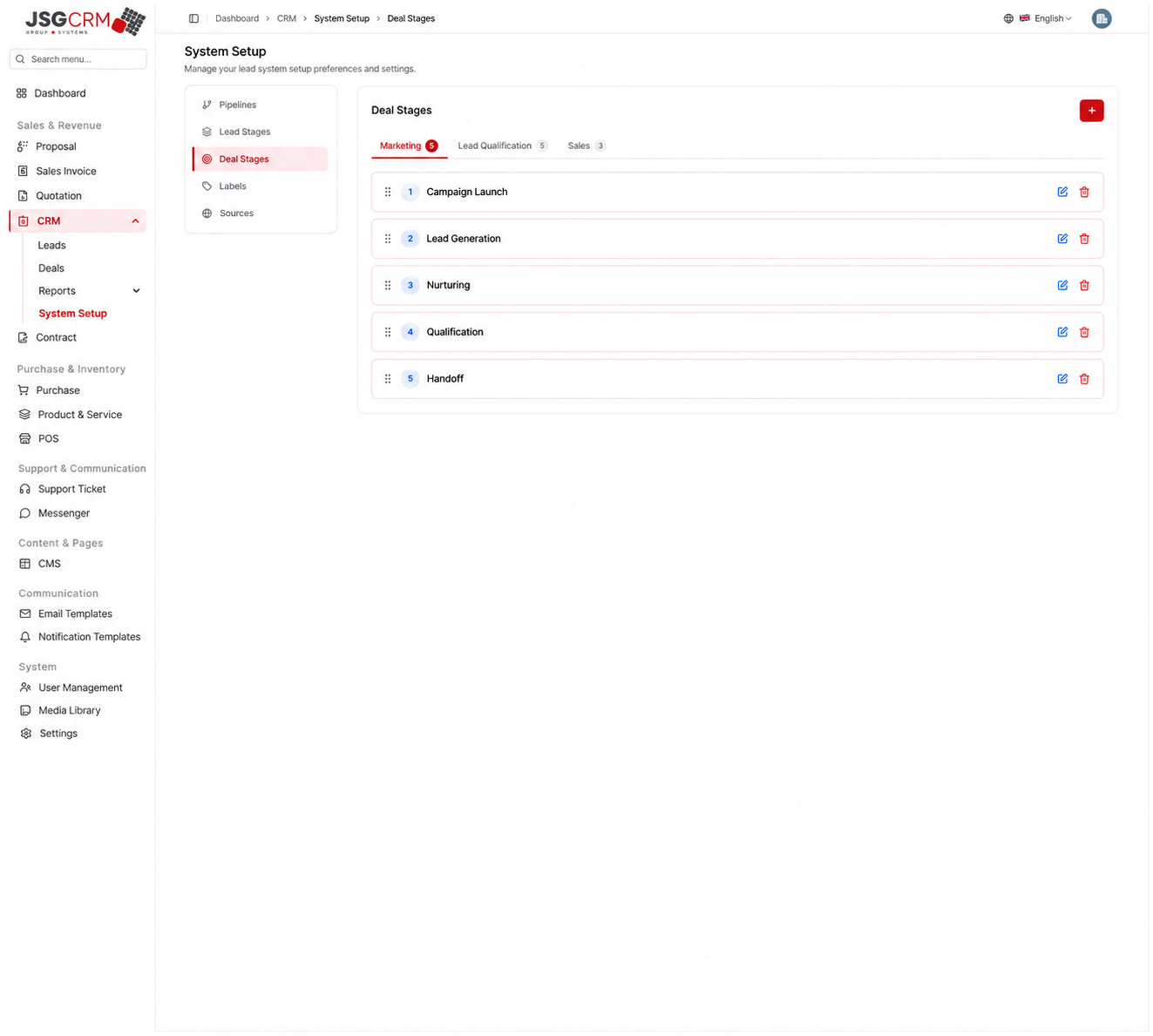
Deal stages across marketing, qualification and sales
Deal stages can differ between marketing, qualification and active selling. Campaign preparation, initial contact, proposal discussion and closing are distinct activities with different responsibilities. JSGCRM keeps these sequences organised by pipeline so the team can review opportunities in the right context.
For a sales CRM project, Bizzeonline maps stage definitions alongside ownership, required information and reporting. This creates a foundation for relevant automation, such as reminders and handovers, while keeping the process understandable to the people who work with it every day.
16 / Inside JSGCRM
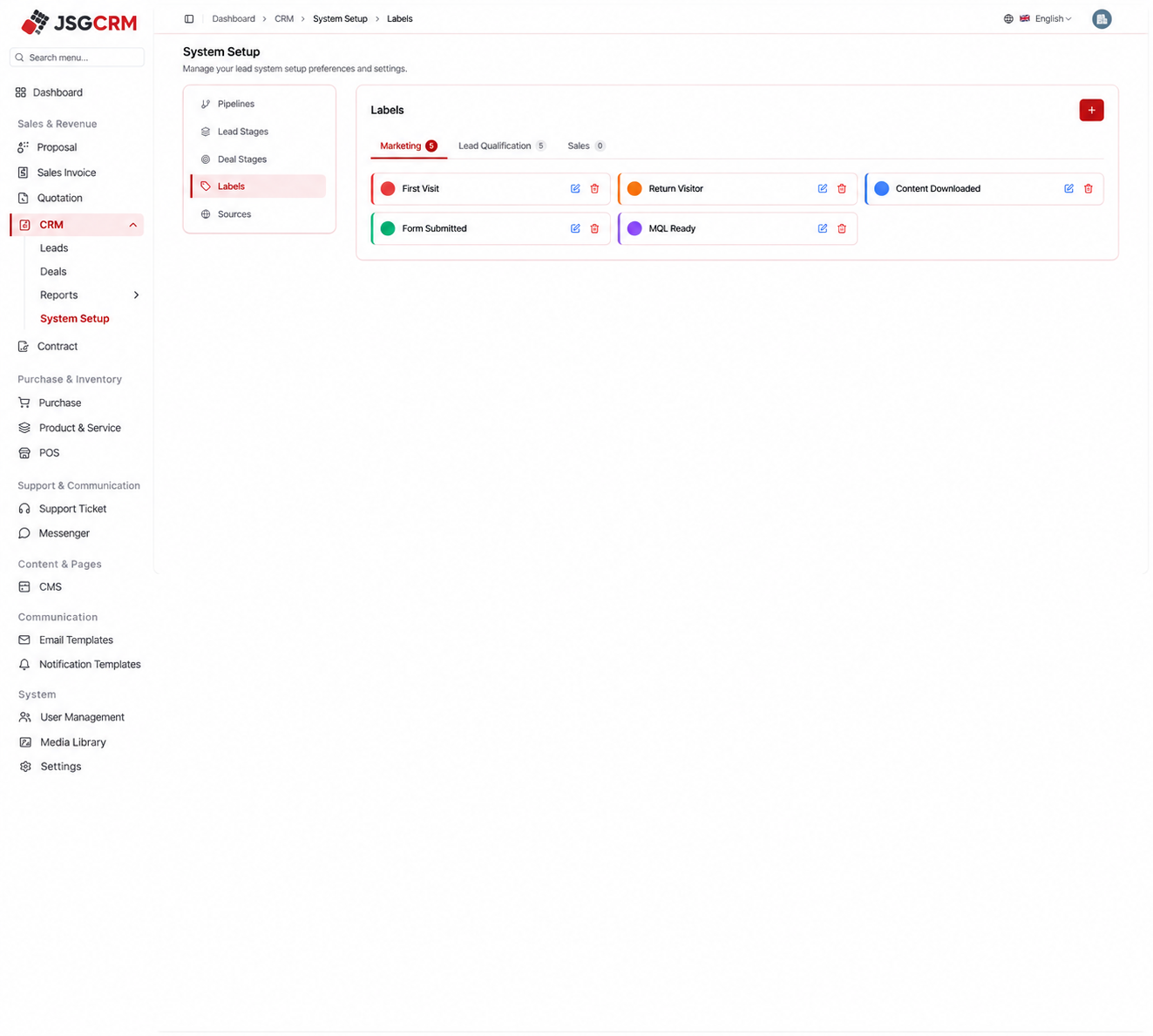
Labels and sources that support consistent reporting
Labels and sources give customer records shared meaning across the team. Marketing engagement labels, qualification priorities and acquisition channels support filtering and reporting when they are defined consistently. System Setup keeps those reference values in one administrative area.
Good CRM software development also plans for change. Teams need a sensible way to retire an old source, rename a label or restrict configuration access while keeping historical records understandable. Our discovery process identifies those needs before a growing list of custom fields becomes difficult to maintain.
17 / Inside JSGCRM
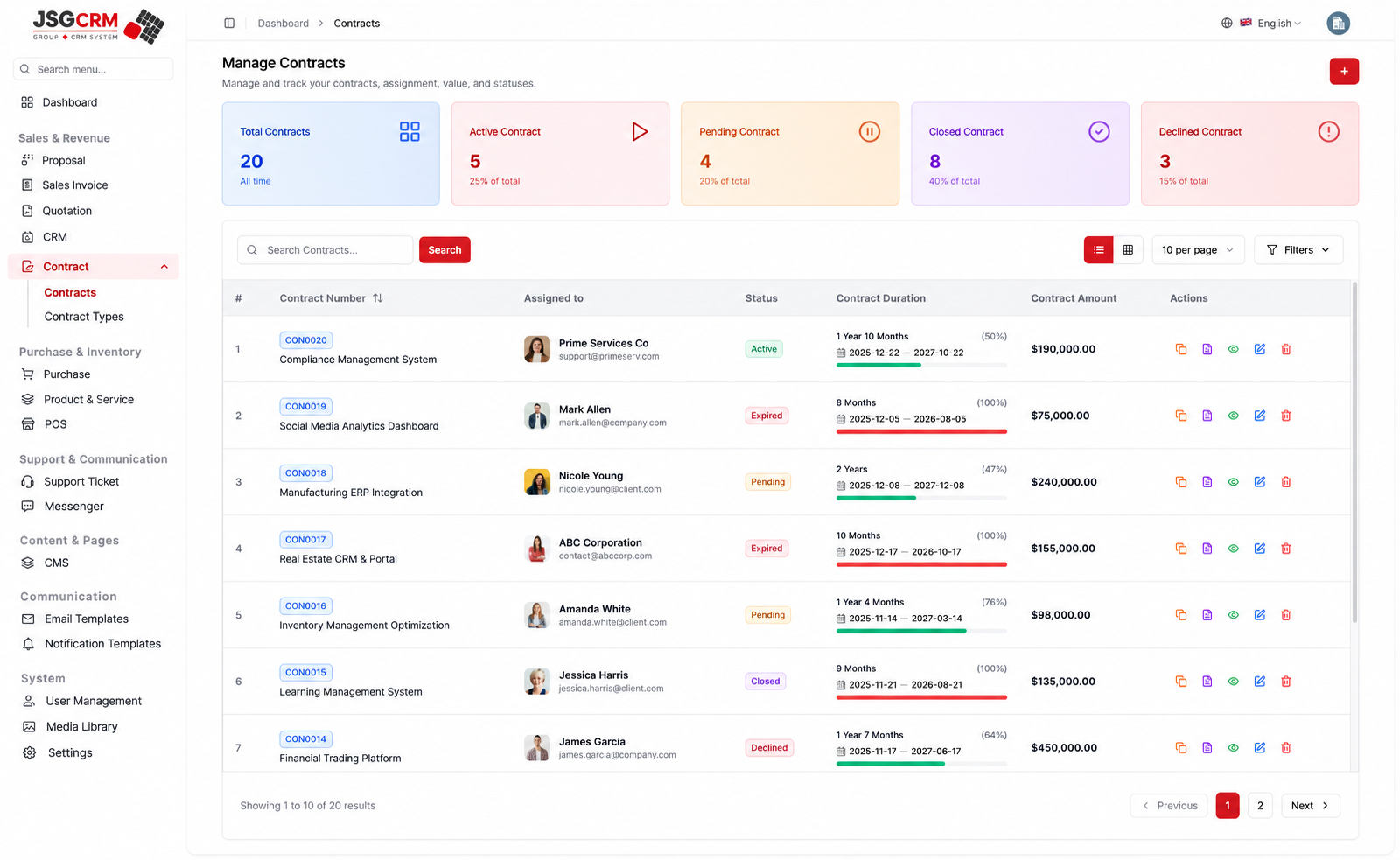
Contracts: a commercial record with its own lifecycle
Contract management extends the sales workspace into the agreement lifecycle. The register groups contract values, assigned users, duration and status. A contract detail keeps the agreement, attachments, comments, notes and renewals together, while Contract Types provides a consistent way to organise different agreements.
For businesses that hand work from sales to operations or account management, this context matters after an opportunity closes. Bizzeonline can scope contract workflows around approvals, document access, renewal ownership and any required signing integration, connecting the commercial record with the next stage of customer service.
- Keep contract status and duration visible during review.
- Retain supporting documents and renewal context alongside the agreement.
- Keep agreement review and contract-type configuration in the same module.
18 / Inside JSGCRM
CRM architecture: React.js, Java Spring Boot and PostgreSQL
For a custom CRM implementation, React.js, Java Spring Boot and PostgreSQL provide an architecture option for connecting a clear working interface with business rules and relational customer data. The implementation approach separates customer and pipeline management, commercial documents, contracts, reporting and notifications into defined responsibilities.
Bizzeonline would assess where a modular service is sufficient and where microservices are justified by independent scaling, integration or team ownership. API design, permissions, transaction boundaries and document-state rules should follow the agreed workflows. The technology choice is part of the implementation plan, not a substitute for understanding the business process.
- React.js: reusable tables, record views and accessible navigation.
- Java Spring Boot: validation, authorization and workflow APIs.
- PostgreSQL: transactions, constraints, query indexes and migration history.
- Microservice boundaries: clear ownership and explicit integration contracts.
19 / Inside JSGCRM
Planning for AWS scalability, security and reliable operations
An AWS deployment approach can combine containerised application services, managed PostgreSQL, secure file storage and background processing. The right infrastructure depends on staff concurrency, record volumes, reporting workload and integration traffic. Capacity planning should reflect those conditions rather than relying on an arbitrary server size.
For scalable CRM software development, our team can define performance targets, load-test representative journeys and use measured API and database behaviour to guide improvements. Monitoring, access controls, backups and recovery planning belong in that discussion from the start so operational support is considered alongside the interface.
- AWS load balancing and container deployment, sized after measurement.
- Private database access, scoped IAM permissions and managed secrets.
- S3 file storage with authorized downloads and retention rules.
- Monitoring for API errors, slow queries, failed jobs and resource saturation.
20 / Inside JSGCRM
Custom CRM development with Bizzeonline: discovery to rollout
A custom CRM engagement works best when delivery is organised around complete user journeys. Discovery should establish lead capture, ownership, follow-up, opportunity progression, sales documents, reporting and contract handovers. Staged reviews then let the business evaluate how those journeys work together before rollout.
An implementation plan can use Git, Docker, CI/CD and infrastructure automation to support controlled releases, with workflow tests, permission checks and database migration review. For a new project, Bizzeonline can help turn the business brief into an agreed scope, integration plan and delivery sequence. Bring your current process, existing tools and priorities to the conversation so the CRM is planned around how your team actually works.
- CI/CD checks: code quality, API contracts, workflow tests and container scans.
- Controlled database migrations with a tested recovery plan.
- Staged review of lead, deal, document and contract workflows.
- Measure agreed usability and operational outcomes after a verified rollout.
CRM implementation approach
Questions about this project
Can Bizzeonline plan a CRM around our sales process?
We can help map your lead sources, qualification steps, team responsibilities, sales documents and reporting requirements into a custom CRM development brief.
Can the CRM connect with our website and existing business tools?
Integration planning starts with the tools you use, their available APIs and which system should own each record. Website enquiries, product catalogues, accounting handovers and notifications can be assessed during discovery.
How do we decide which CRM features to build first?
Start with the handovers that create the most daily friction. Lead ownership, follow-up, customer history and commercial documents can form the initial scope, with additional automation planned around agreed priorities.
How should we start a CRM development project with Bizzeonline?
Share your current sales process, existing software, integration needs and launch priorities through the enquiry form. Our team can discuss the workflows and define the next discovery steps.
Interface illustrations are adapted from supplied ERPGo screens. The architecture section describes an implementation approach; production deployment and client performance results are not documented here. About the team.